Swipe Billing Software Review: Features, Pricing, Downloading, and Alternative [2026]
January 18, 2026175 views
0
Efficient billing is the backbone of a healthy business as without
it, cash flow becomes unpredictable, clients get confused, and
operations slow down. Tools like Swipe Billing software promise to
automate invoices, payments, and customer management so you can stay
focused on growing your business. But users often wonder whether Swipe
actually delivers. In this Swipe Billing software review, I’ll show you
everything you need to know about Swipe Billing software and help you
decide whether it suits you.
Swipe Billing Software Review
Swipe Billing Software
Review
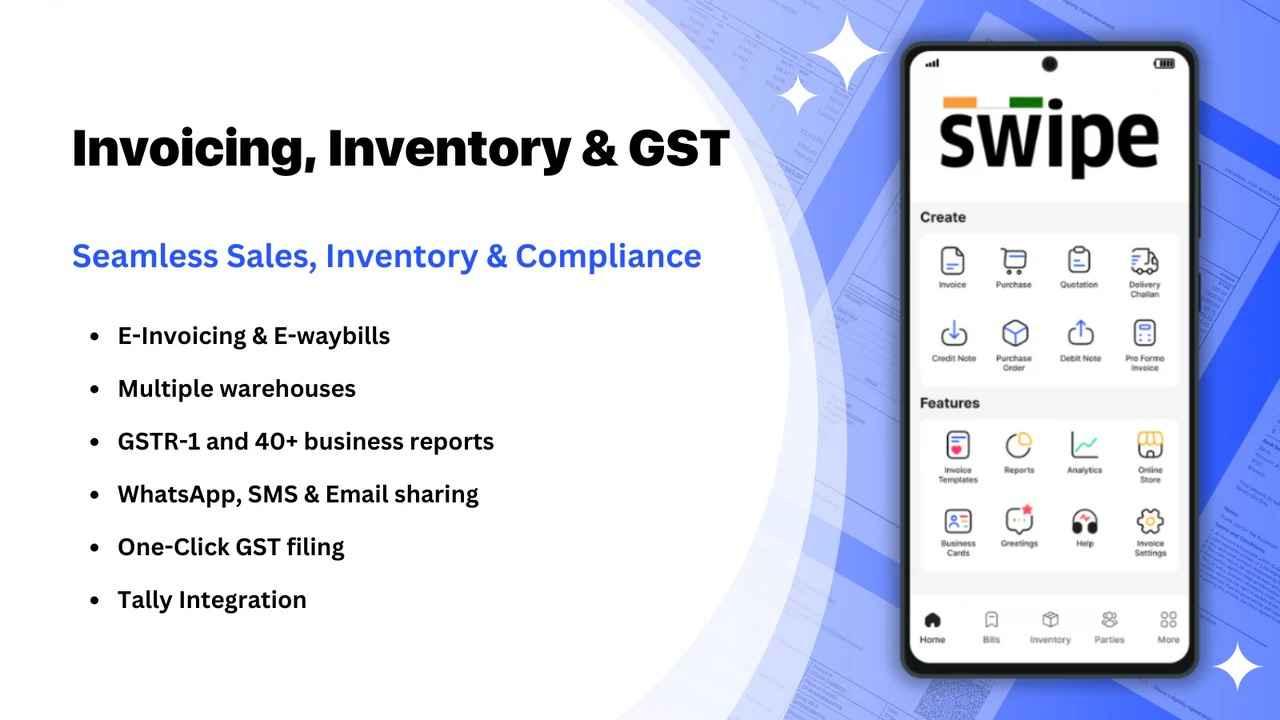
For those asking what is SwipeBilling software, it is an invoicing and billing tool built
for small and medium-sized businesses that want a simple yet structured
way to manage payments. This Swipe Billing software review examines how
it enables GST-compliant invoice creation, inventory management, sales
tracking, and payment collection from a single dashboard. The interface
is lightweight and simple enough that you don’t need a tutorial to get
started.
But that simplicity comes with trade-offs, once your business grows
into more complex billing needs or multi-branch inventory, you may start
feeling the limits of what Swipe can handle.
Swipe Billing Software Features
Features:
Invoice Creation: You can generate GST-compliant
invoices, add items from inventory, apply taxes, and send invoices
directly via WhatsApp, email, or link.
Inventory & Stock Tracking: Swipe
automatically adjusts inventory levels based on invoices, helping you
track stock without manually updating sheets.
Payment Collection: Integrations with UPI,
Stripe, and payment links allow your clients to pay online. Payments are
tracked in the dashboard for easier accounting.
Business Reports: You can view sales charts,
outstanding invoices, tax reports, and payment reports in real
time.
Client Management: Swipe stores customer
profiles, past invoices, credit balances, notes, and more.
Swipe is budget-friendly,
but add-ons and integrations can increase the total cost. If you only
need quick invoice generation with no ongoing subscription, it might
feel a bit expensive compared to free tools. With that in mind, here’s a
clearer look at where Swipe performs well and where it falls short.
Pros
Easy and simple invoice creation
Good for GST and compliance-heavy businesses
Convenient mobile app
Payment link support
Cloud sync across multiple devices
Cons
Limited invoice template customization
Complex pricing still requires manual setup
Can feel too simple for businesses with diverse billing
structures
The free version has restrictions
Swipe works great for small teams and retail-style invoicing, but if
your business requires advanced work, custom branding, or flexible
billing models, you may outgrow it quickly.
How to Download Swipe
Billing Software
The process of downloading Swipe Billing software is a bit different
depending on whether you’re using the desktop app or the mobile version.
Swipe doesn’t offer a traditional Windows or Mac installer; instead, its
desktop experience runs through a web dashboard, while the Android andiOS apps handle
on-the-go billing. That means the real “installation” happens on your
phone, and the setup is quick as long as you know where to look.
Download for Windows/Mac
Swipe doesn’t provide a traditional installer for Windows or Mac,
which can confuse new users who expect a downloadable desktop app.
Instead, the desktop version runs entirely through the browser using
Swipe’s web dashboard. Here’s how to download and how to use Swipe
Billing software.
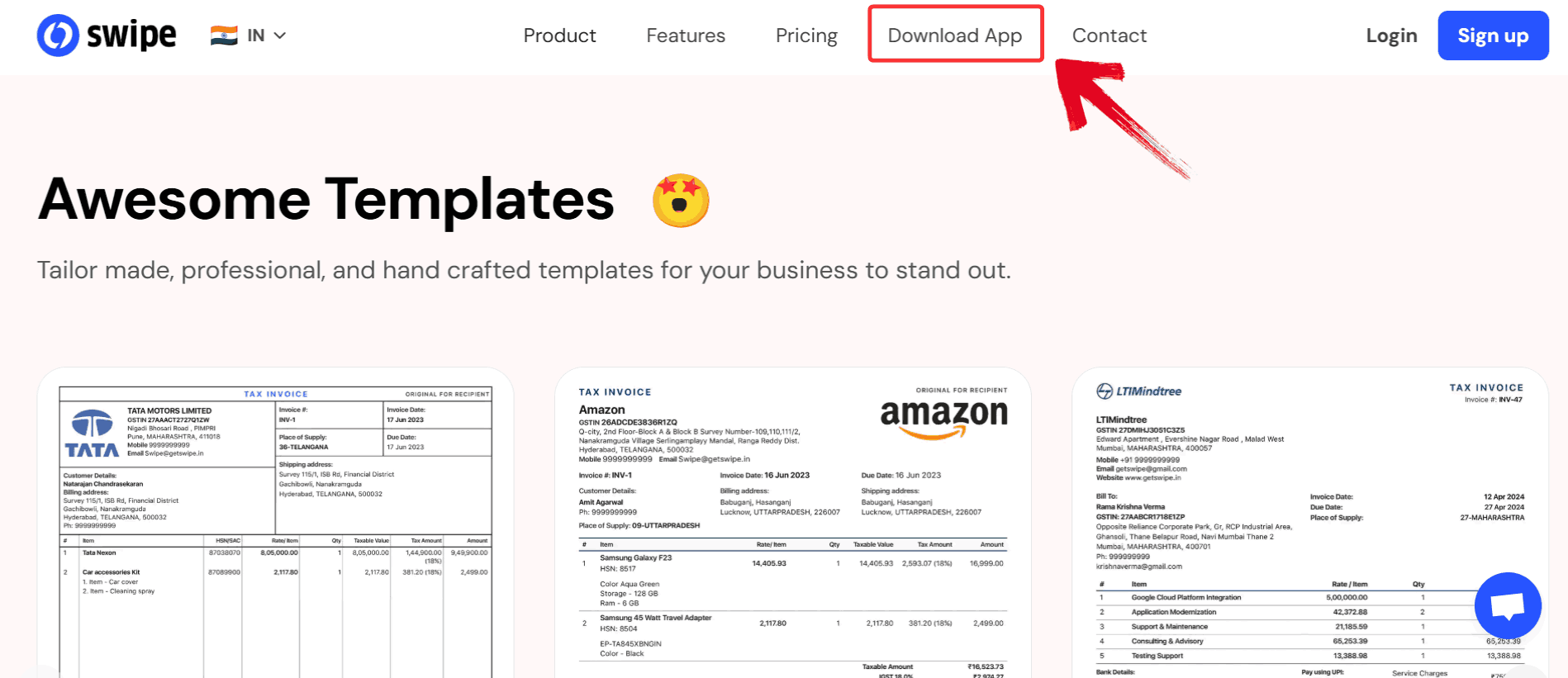
Step 1: Go to the official Swipe website and click
on “Download App” from the top navigation bar.
Swipe Billing Website
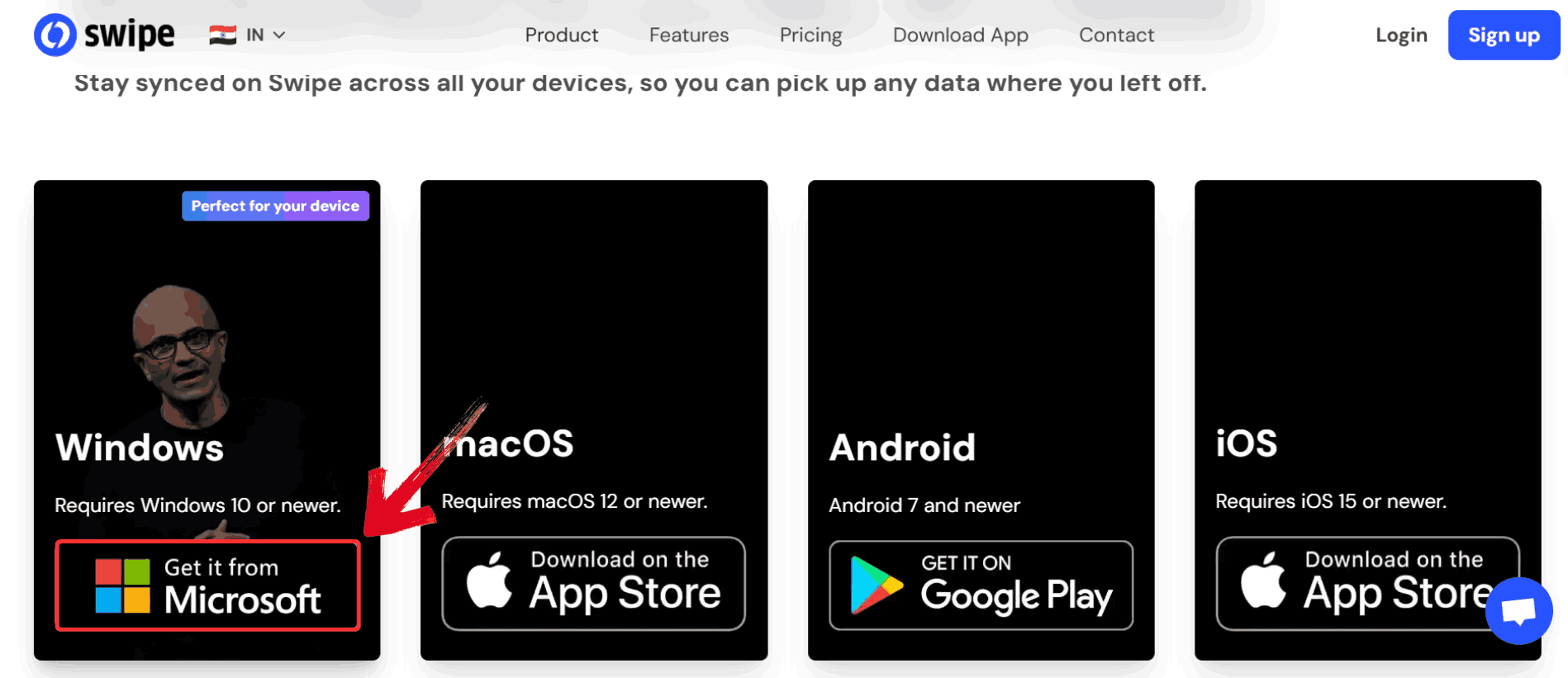
Step 2: Select the “Microsoft”option to access the Windows version of the app.
Swipe Billing Website
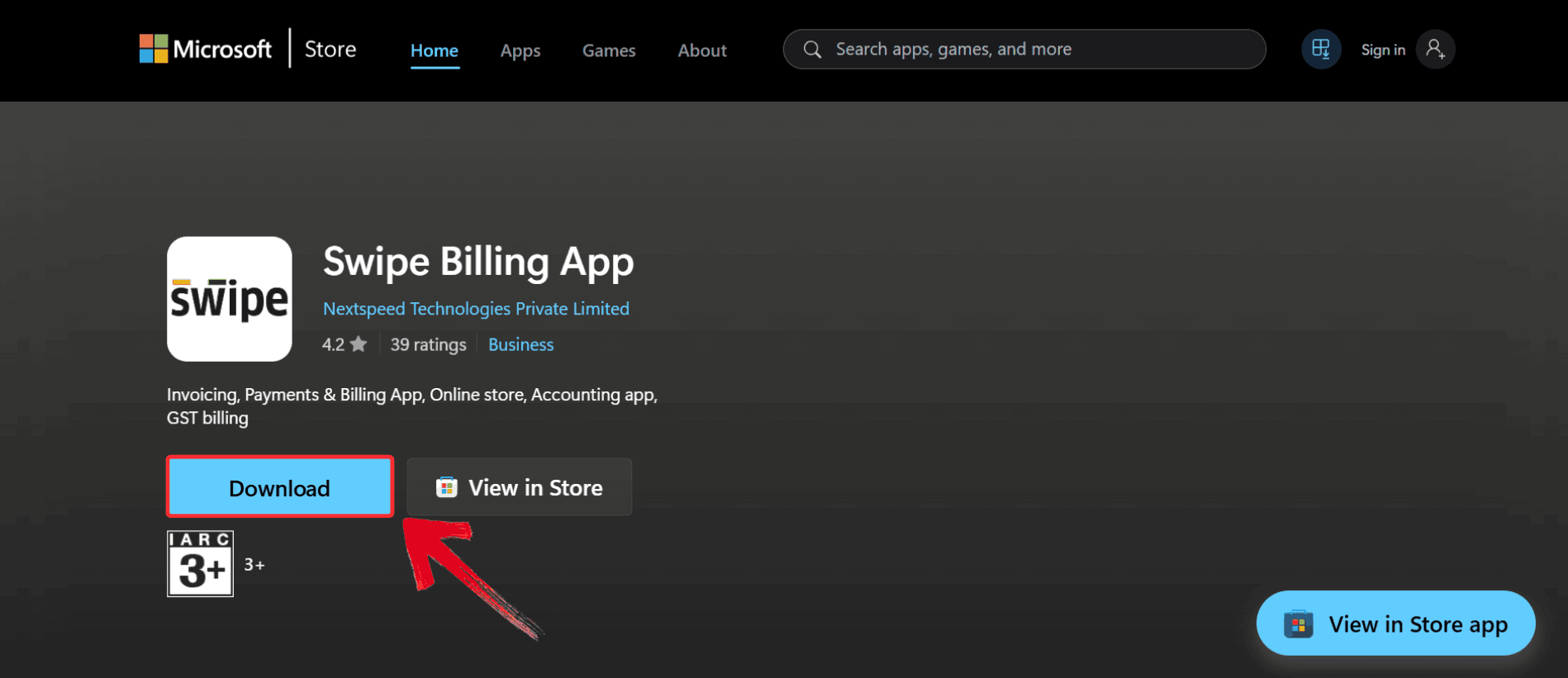
Step 3: You’ll be redirected to the Microsoft Store,
just click “Download” and the app will automatically
install on your device.
Swipe Billing Website
Download for Android
Downloading Swipe on Android is straightforward and quick, as the app
is fully available on the Google Play Store. Once installed, you can
access all your invoices, track payments, and manage inventory directly
from your phone. Here’s how to install it.
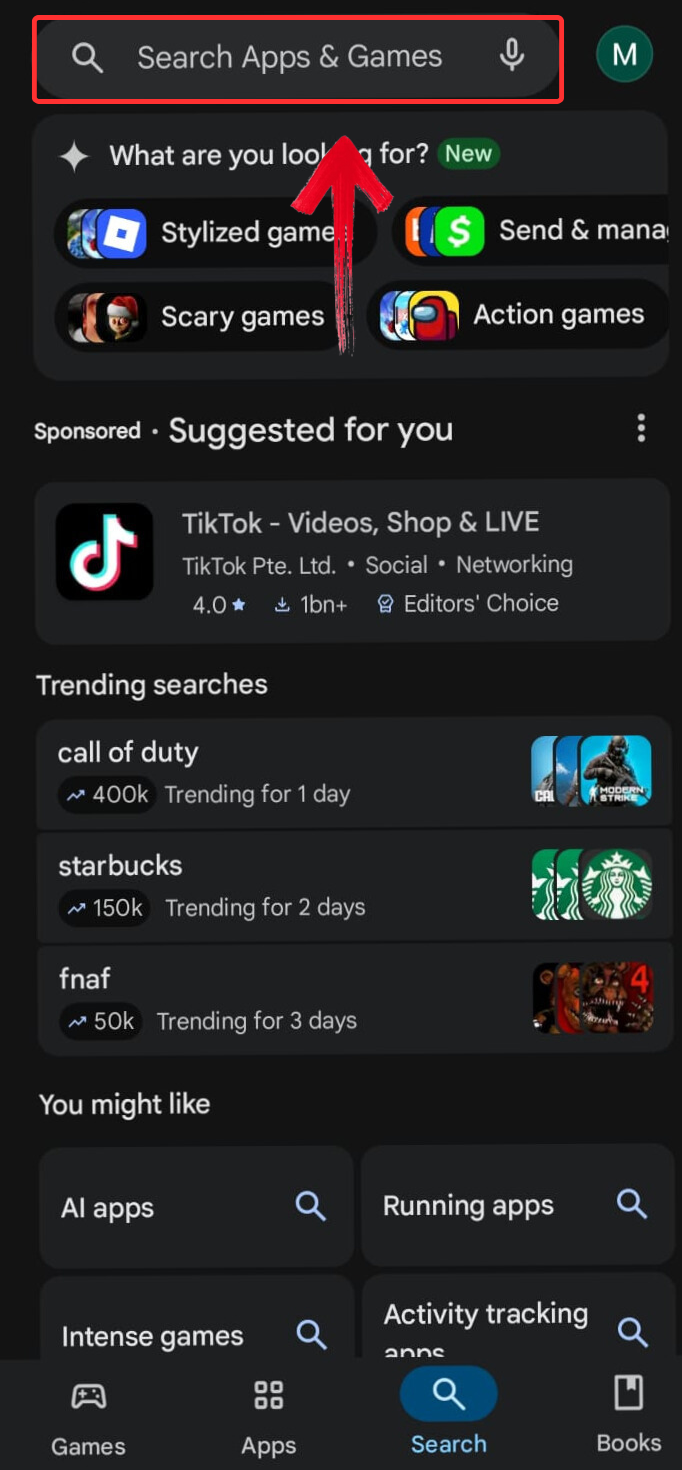
Step 1: Go to the Google
Play Store and tap the search bar at the top of the screen.
Tap Search Bar
Step 2: Type “Swipe Billing” into
the search field and wait for the suggestions to load.
Type Swipe Billing
Step 3: Select the “swipe billing
software” app from the results, and you’ll be taken to the
official app page.
Select Search Result
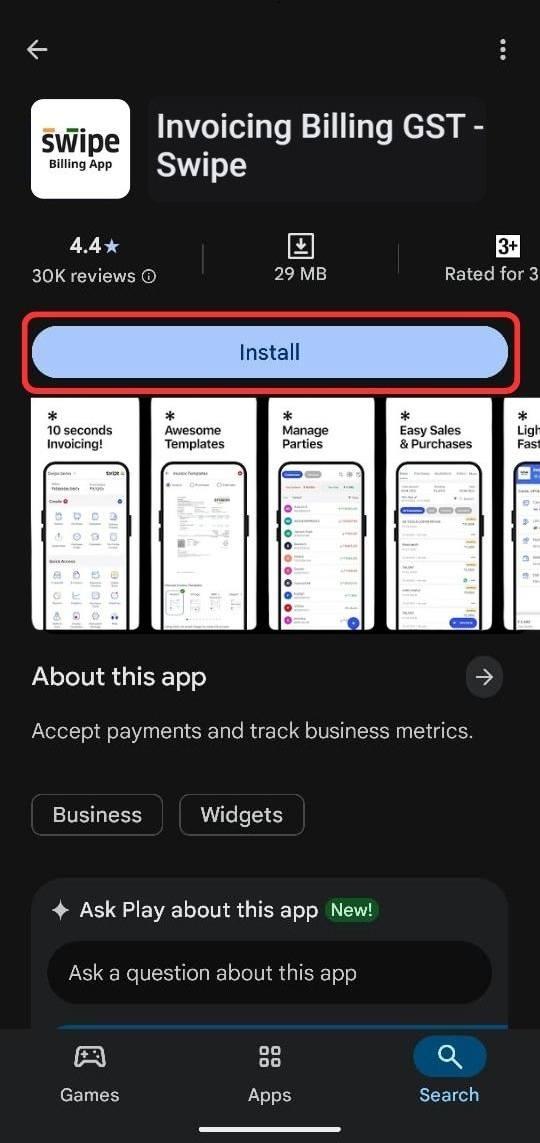
Step 4: Tap the “Install” button,
and the download will begin automatically.
Install App
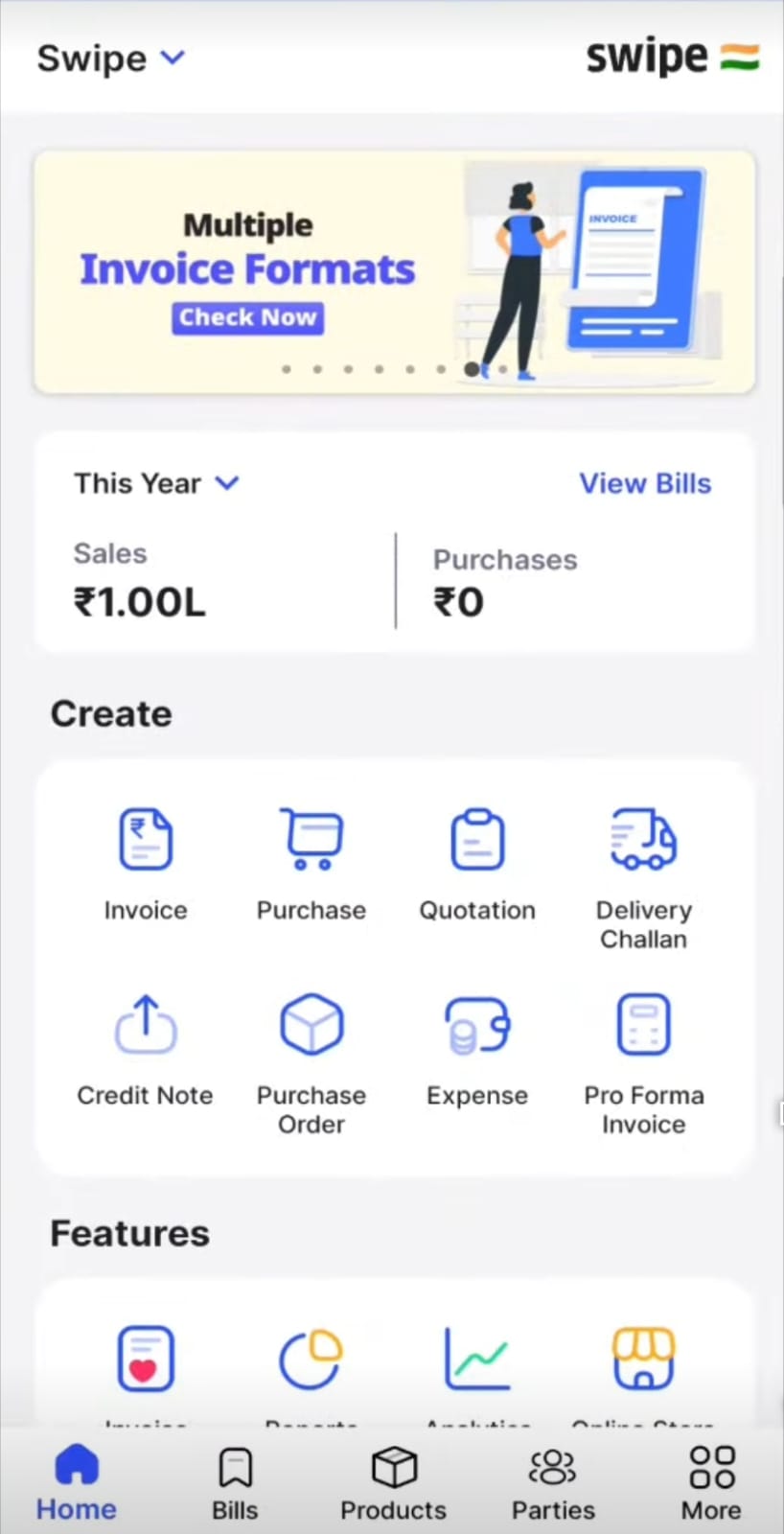
Step 5: Open the app once the installation completes
to set up your account and start managing your invoices on Android.
Browse App
Download for iOS
Swipe’s iOS app is available on the Apple App Store and brings the
full billing experience to your iPhone or iPad. It’s a convenient option
for users who need to handle billing while on the move. Here’s how to go
about it.
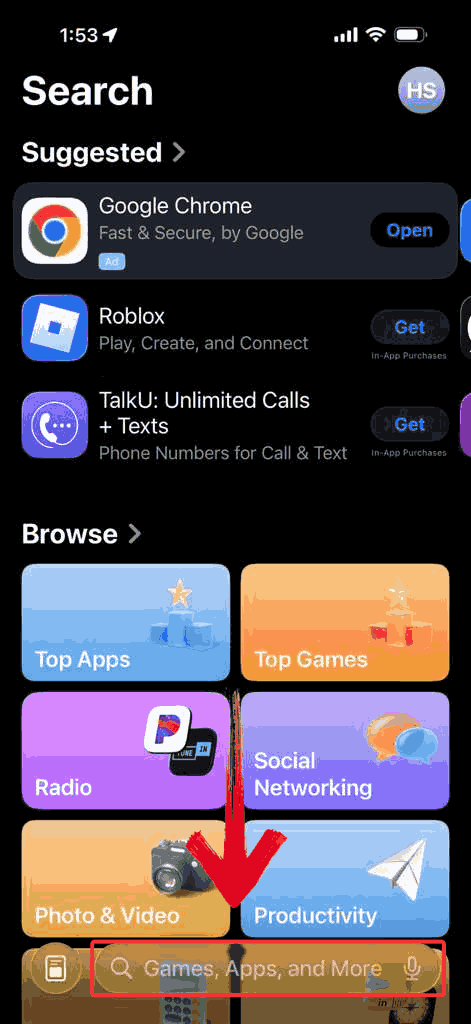
Step 1: Go to the App
Store and tap the search bar at the bottom of the screen.
Search Bar
Step 2: Enter “Swipe Billing” into
the field and press the Search icon to view the
results.
Search Swipe Billing
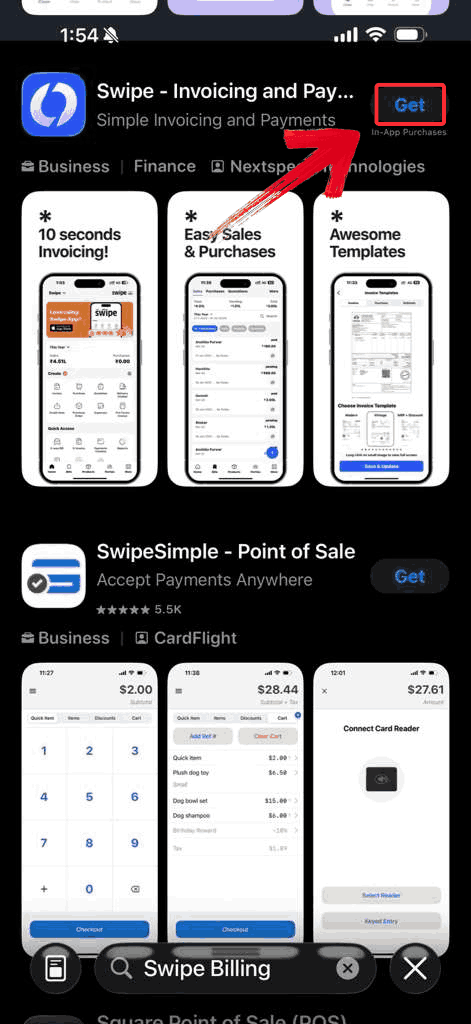
Step 3: Tap the “Get” button, and
the download will begin automatically.
Get App
Step 4: Once the installation is finished, launch
the app and begin managing your invoices on your iPhone.
Browse App
Best
& Quick Alternative – Professional Free Invoice Generator
Most apps systems tend to assume you’re managing a complex operation
with recurring clients, inventory, and long-term records. But sometimes
you just need something straightforward: a simple invoice you can
generate in a minute without downloading software or setting up an
account. The WPS Invoice
Generator fits that gap well. It loads instantly in the browser,
requires no login, and supports structured invoice fields with automatic
calculations. Because it exports directly to PDF with consistent
formatting, it works well for users who send only a few invoices per
month and don’t want the overhead of installing or learning a full
billing system.
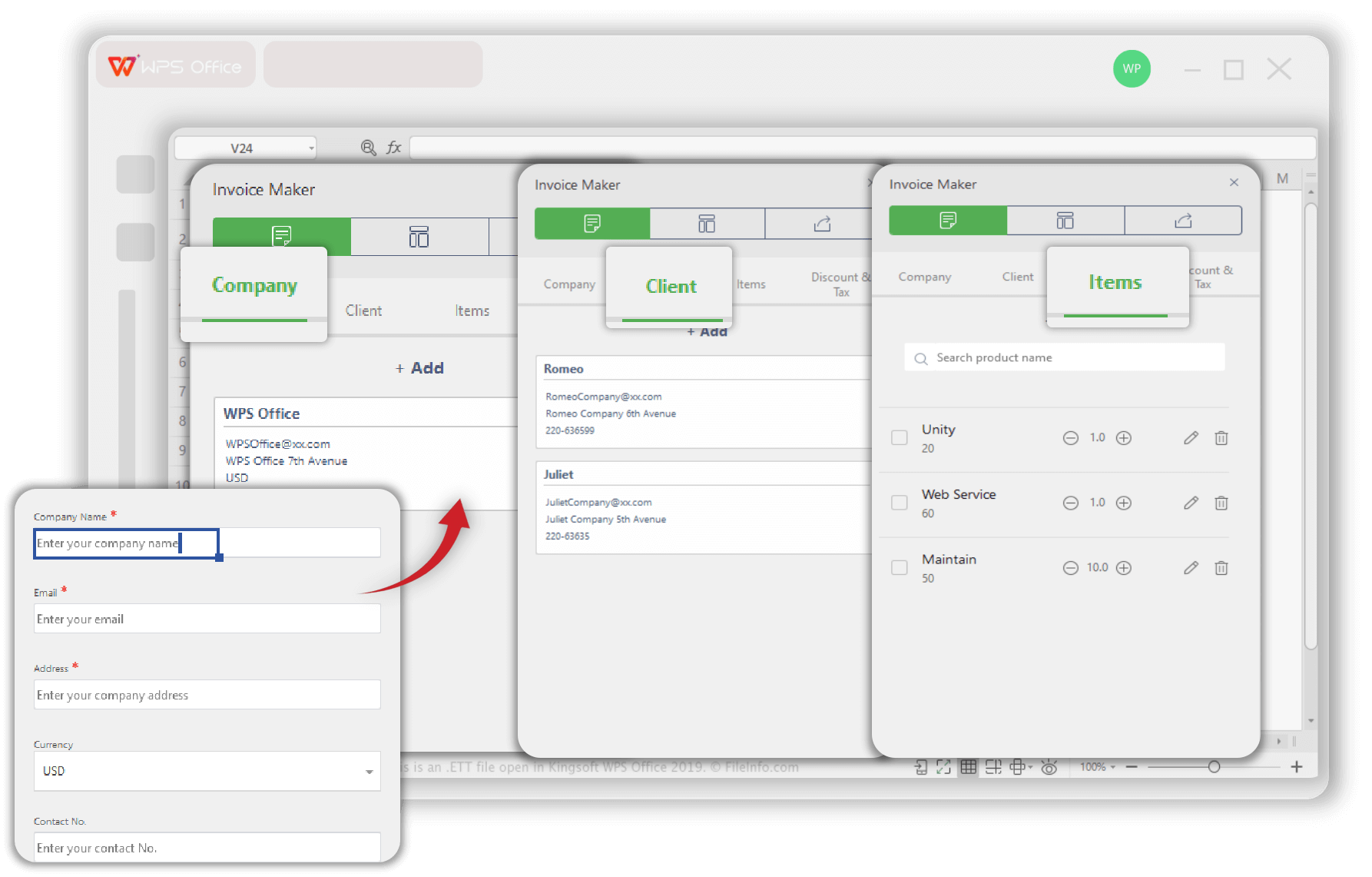
WPS Invoice Generator
Features
Free & no sign-up required: You can create
invoices immediately without registering, subscriptions, or hidden
fees.
Excel-based invoice creation: You can generate
invoices directly in your browser or via the WPS Office spreadsheet
tool.
Customizable invoice templates: Choose from
professionally designed invoice templates; you can add your logo,
brand colors, business details.
Automatic calculations: The tool automatically
calculates item totals, overall totals, taxes or discounts reducing
manual errors and saving time.
Reusable client data: Save client and product or
service information so future invoices can be generated faster, without
re-entering details each time.
After testing these features, it became clearer where the WPS Invoice
Generator delivers and where it might feel limited depending on how much
you invoice. It’s great for fast billing, but it’s still a lightweight
tool compared to a full billing system. So before relying on it as your
primary invoicing solution, it helps to look at its strengths and
trade-offs.
Pros
Completely free
No software installation
Highly customizable invoices
Works on any device
No limits on usage
Cons
Not a full billing system
No inventory or expense tracking
Even with these limitations, it’s the ideal tool for quick invoicing
without ongoing fees. Here’s a simple example of how you can create an
invoice in WPS Invoice Generator:
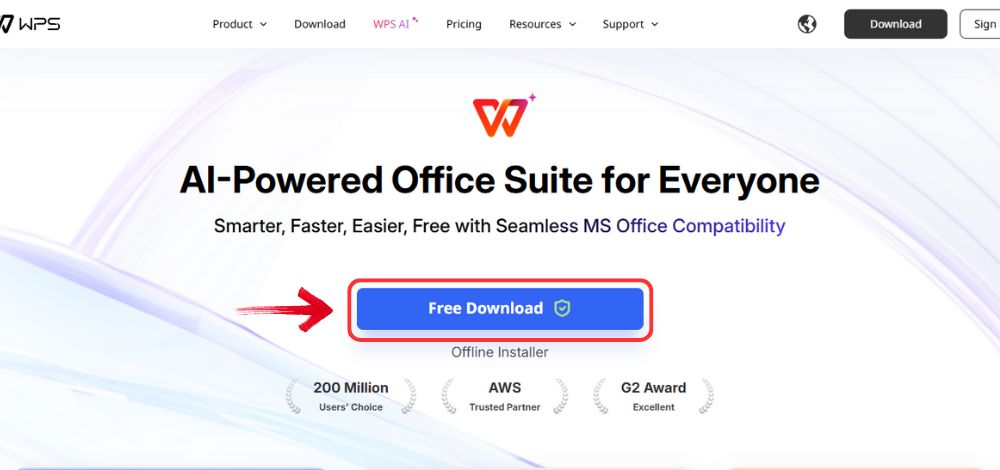
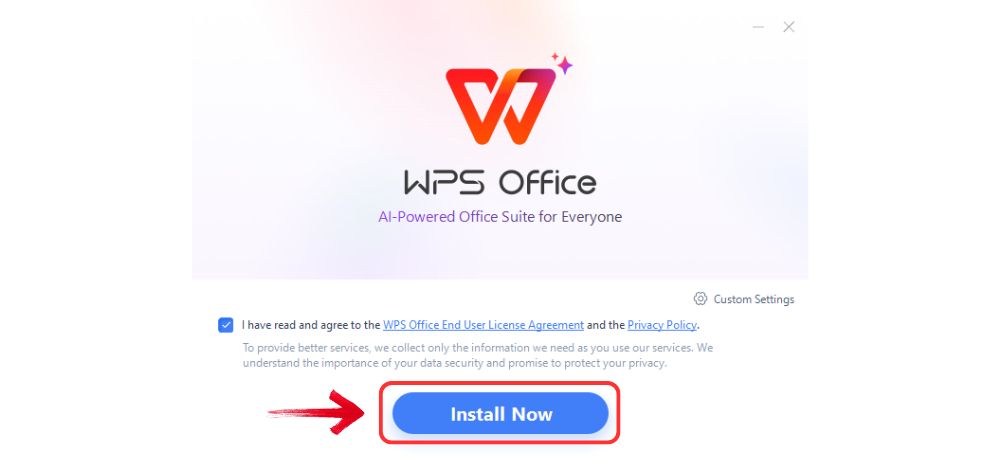
Step 1: Go to WPS
Office, and click the “Free Download” button to
install WPS Office on your computer.
Download WPS Office
Step 2: Once the download is complete, run the setup
file as you would with any other app. Follow the on-screen instructions
to install it.
Install WPS Office
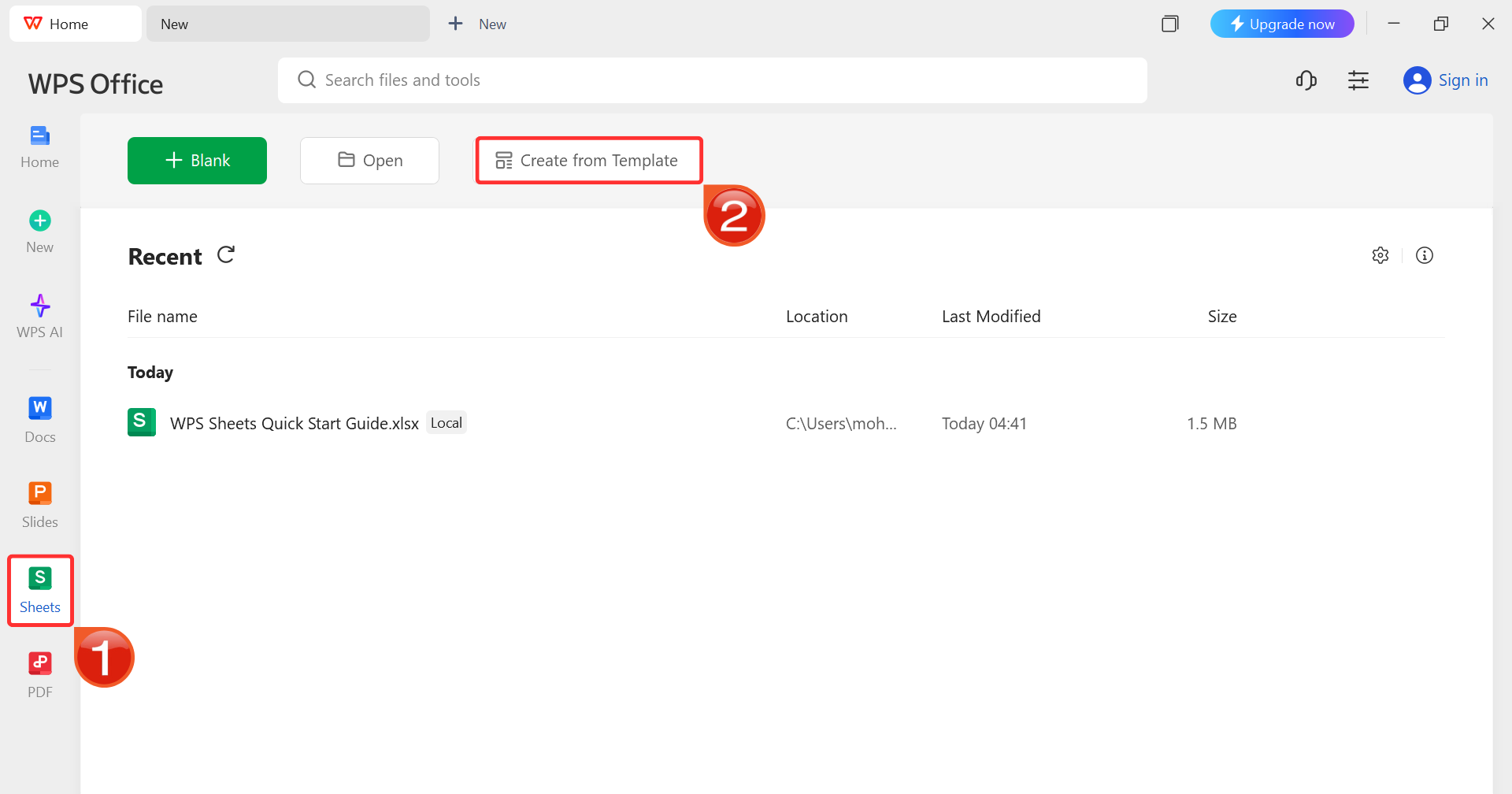
Step 3: On the WPS Office dashboard, click“Sheets” from the left sidebar and hit “Create
from Template” to launch WPS Spreadsheet using your desired
template.
WPS Spreadsheet Dashboard
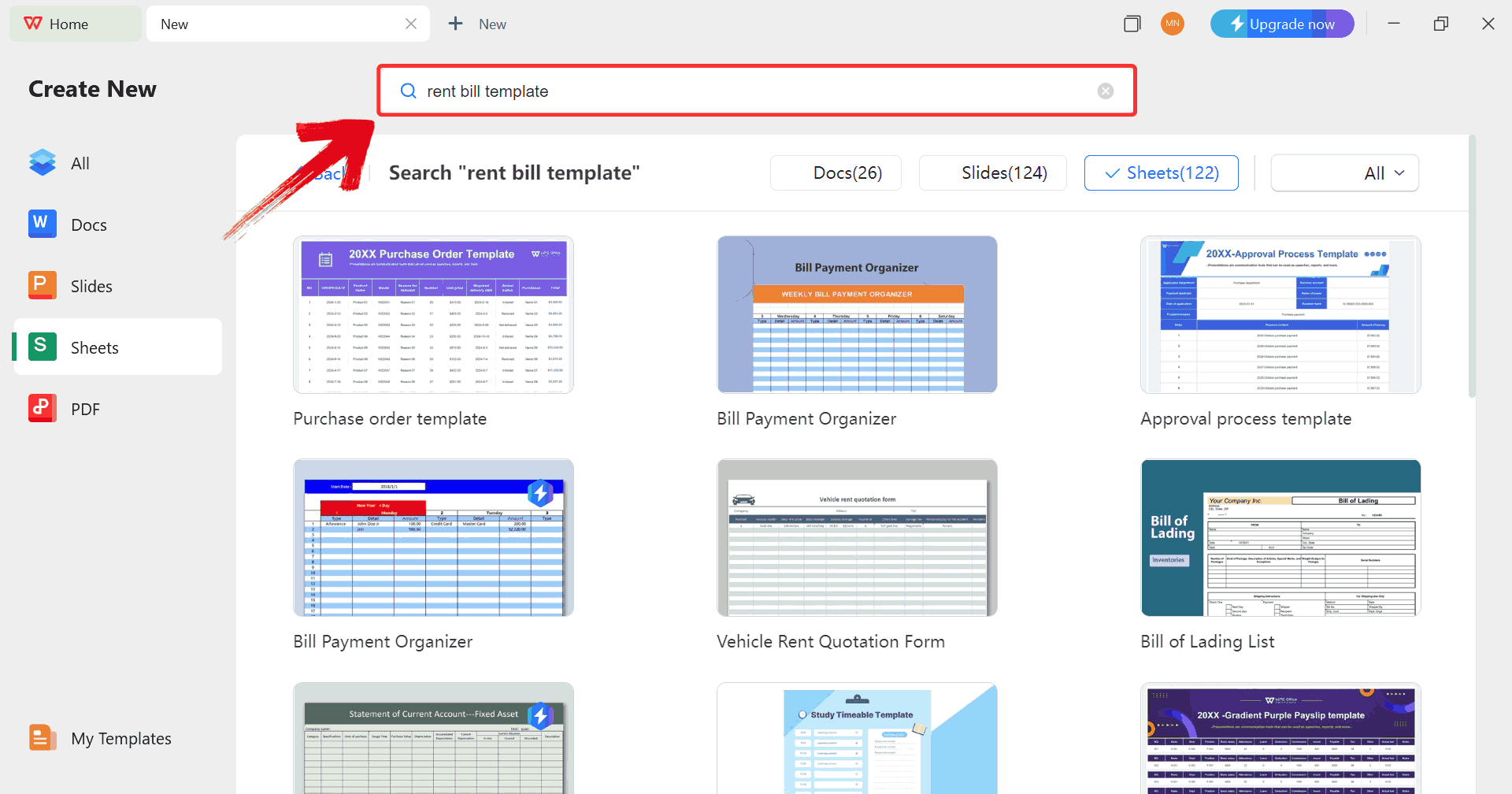
Step 4: In the template gallery’s search bar, you
can search for any invoice such as “rent bill template”to see all available rent bill invoices ready for use.
Search Template
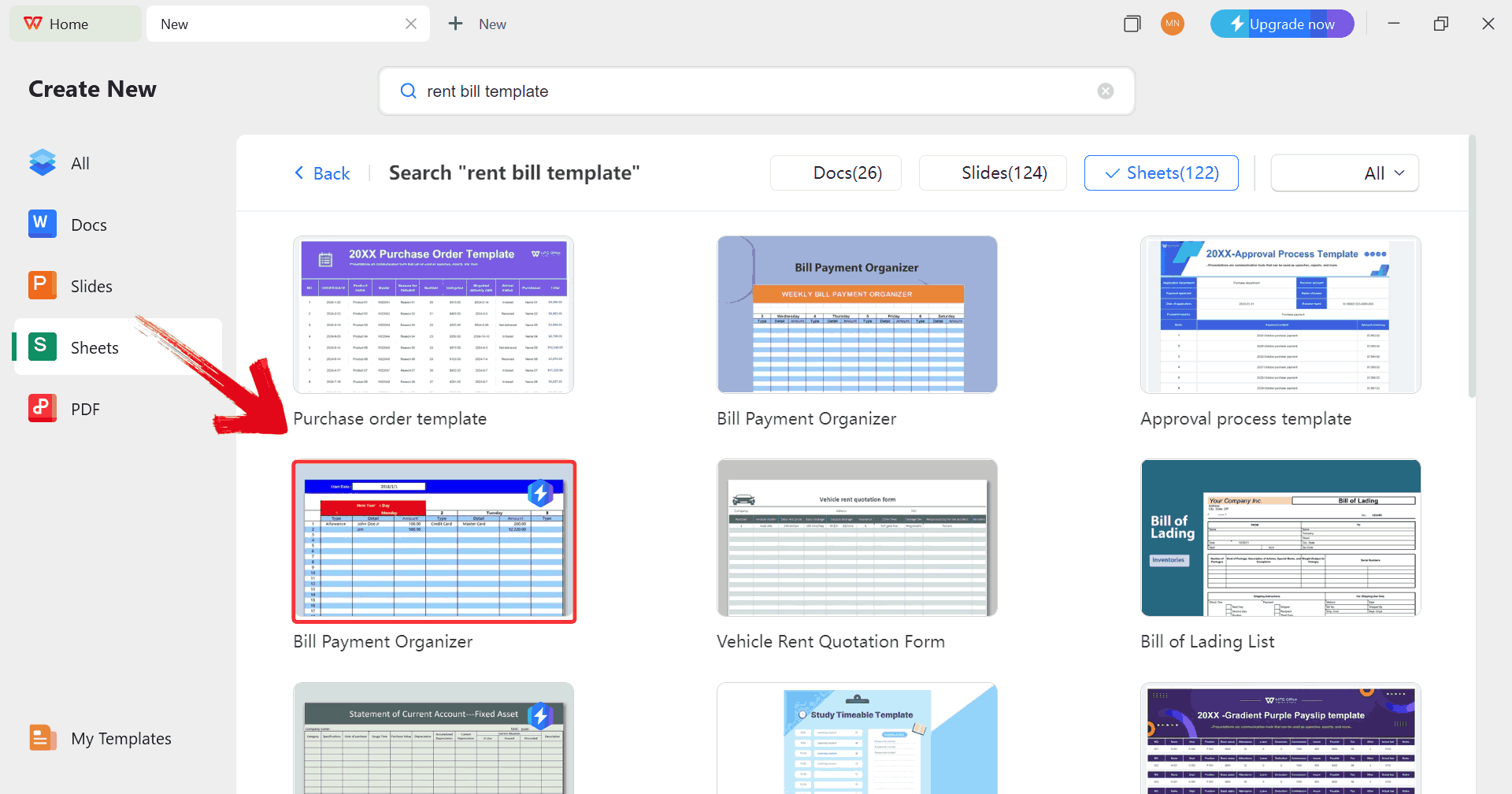
Step 5: Just click on any template that fits your
needs to open it and start customizing your template right away.
Choose Template
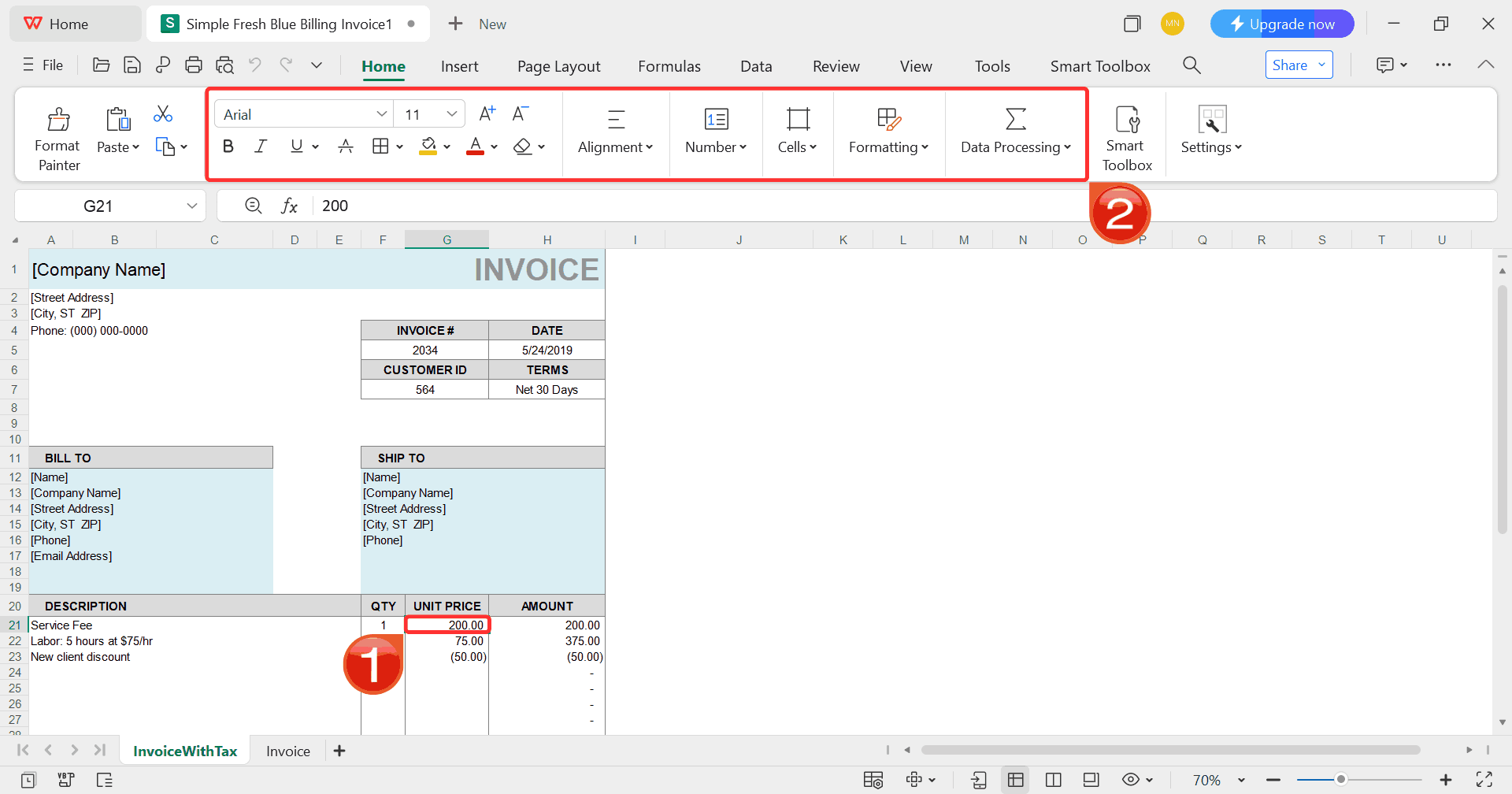
Step 6: Select any cell in your spreadsheet, and
then use the menu at the top to make whatever changes you need like
adjusting formatting, editing text, or changing formulas.
Customize Template
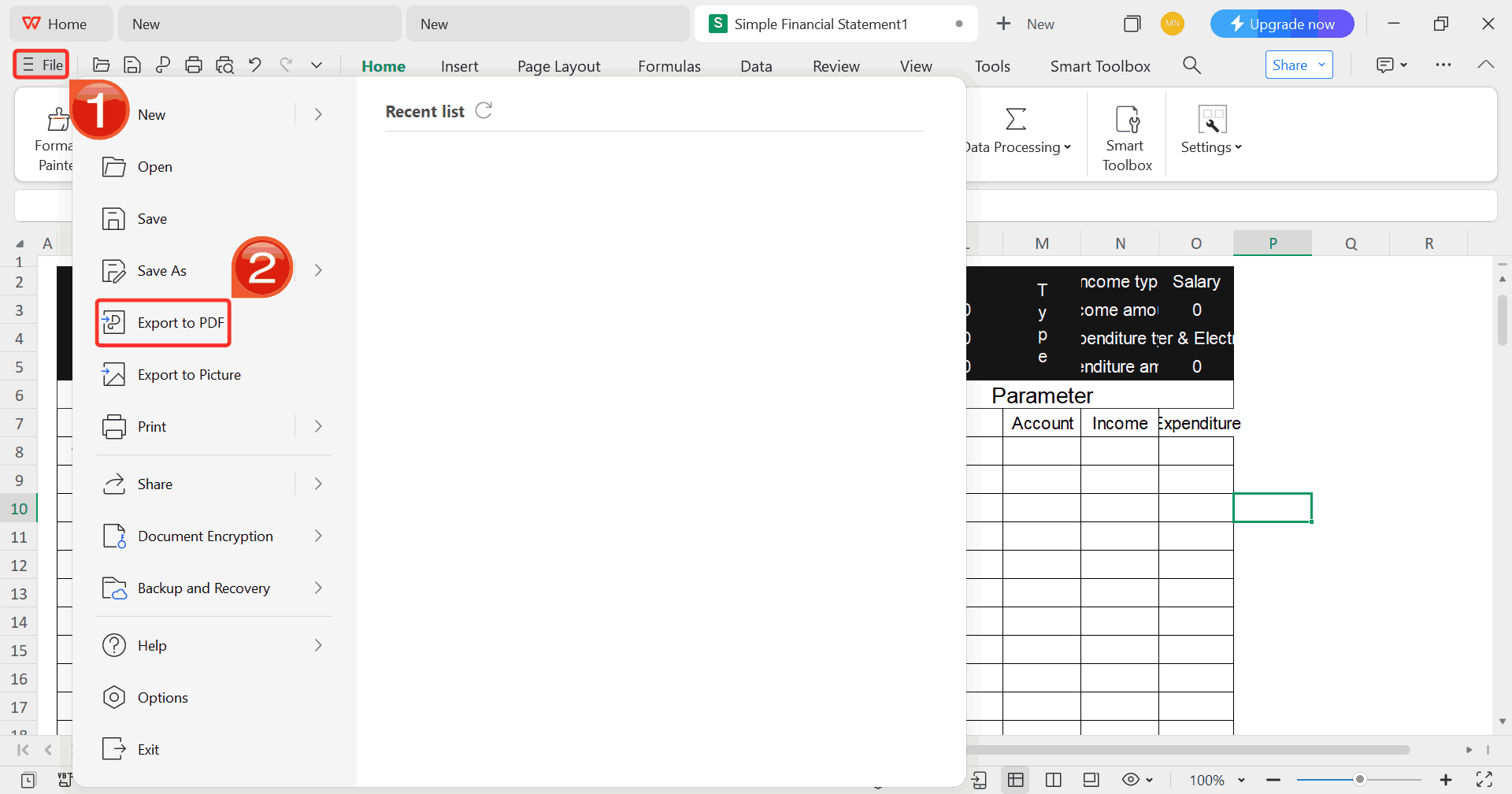
Step 7: Once you’re done customizing your template,
click on “File”, then select “Export to
PDF” to save your rent bill in a shareable format.
Export Template
Professional
Free Invoice Generator V.S. Swipe Billing Software
After exploring Swipe’s download options and how it works across
desktop and mobile, I started wondering if I really needed a full billingsystem or if a simpler invoice generator like WPS Invoice Generator
might serve my needs just as well. WPS Office proved to be a strong
Swipe Billing software alternative, so I compared it side by side to see
how each performs for quick invoice creation, weighing convenience
against functionality, and determining which tool fits my setup without
overcomplicating things.
Feature
Swipe Billing
Software
WPS Office Free Invoice
Generator
Pricing
Paid (with free basic)
Completely free
Installation
Required
No installation
Invoice Templates
Limited
Highly customizable
Business Management
Full billing system
Invoice-only
Ease of Use
Simple
Extremely simple
Best For
SMBs needing billing
Freelancers needing quick invoices
Device Compatibility
Mobile & desktop
Any browser
Branding Options
Basic
Advanced customization
If your main need is fast, customizable,
professional invoices without any subscription, WPS Invoice Generator is
unbeatable. Swipe is better for full business management, but for pure
invoicing, the free alternative wins easily.
FAQs
1. How
does Swipe differ from a simple invoice generator?
Swipe is a full billing system with reports, inventory, and payment
tracking. A basic invoice generator only creates individual
invoices.
2. Can Swipe integrate
with other software?
Yes. Swipe integrates with payment gateways and some accounting tools
depending on your plan.
3. Does Swipe handle
complex pricing models?
Yes, it supports tiered, usage-based, and subscription pricing.
4. Is Swipe good for
freelancers?
Freelancers may find Swipe helpful, but the pricing may feel
unnecessary if they only need basic invoices.
5. Is Swipe safe to use?
Yes, but always download from the official website to avoid
unofficial versions.
6. Is there a
completely free alternative to Swipe?
Yes, Professional Free Invoice Generator offers all invoice creation
tools for free.
Swipe Away with WPS
Efficient billing is becoming a necessity rather than a luxury, and
this Swipe Billing software review shows how Swipe aims to simplify
day-to-day invoicing, payments, and client management. Its interface and
straightforward tools make it approachable for small businesses that
need structure without complexity. At the same time, its limitations
like restricted customization can be challenging for users who want more
flexibility. WPS Invoice
Generator offers a fast, customizable way to create invoices
without subscriptions or downloads. It keeps things simple while giving
you full control over branding and layout. Swipe may be useful for full
billing workflows, but if your priority is quick, refined invoices at
zero cost, WPS Invoice Generator delivers exactly what most users
need.
7+ years in productivity tech. I test and review the latest tools to simplify your workflow. Follow for honest app comparisons, practical guides, and curated tech picks to boost efficiency.

'%3e%3cpath%20fill-rule='evenodd'%20clip-rule='evenodd'%20d='M19%208.5C24.799%208.5%2029.5%2013.201%2029.5%2019C29.5%2024.6782%2024.9928%2029.3036%2019.361%2029.4939L19%2029.5C18.8794%2029.5%2018.7592%2029.498%2018.6396%2029.4939L18.2811%2029.4758C12.8174%2029.1063%208.5%2024.5574%208.5%2019C8.5%2013.201%2013.201%208.5%2019%208.5ZM22.3063%2010.6267L22.2342%2010.6539C21.3423%2011.0061%2020.5541%2011.6368%2020.5606%2012.4987C20.5631%2012.8302%2020.869%2014.8871%2020.2141%2014.8486C19.5589%2014.8102%2019.413%2013.8753%2018.7116%2013.616C17.5944%2013.2026%2016.9819%2014.3401%2017.0939%2015.3106C17.1695%2015.9655%2018.9289%2018.3871%2017.9028%2019C17.292%2019.3651%2015.7279%2017.5692%2015.1007%2017.1842C14.4805%2016.8034%2013.2758%2017.3333%2012.4974%2016.7029C11.9874%2016.2899%2012.3881%2014.4098%2012.2786%2013.8372C12.2271%2013.5698%2012.1155%2013.3689%2011.9794%2013.2166L12.0402%2013.2934C10.7653%2014.8464%2010%2016.8339%2010%2019C10%2023.8465%2013.8307%2027.7982%2018.6295%2027.9925L18.6769%2027.9747C18.8597%2027.8677%2019.0394%2027.7557%2019.216%2027.6387C19.4137%2027.4534%2019.5436%2027.2072%2019.5849%2026.9394C19.8806%2025.1222%2018.3616%2025.4302%2017.9367%2024.5622C17.5489%2023.7695%2018.5712%2023.7684%2018.5524%2021.7923C18.4607%2021.1774%2018.5279%2020.547%2018.7211%2020.0315C19.1834%2018.7987%2020.7077%2017.2643%2022.5889%2018.0081C23.5567%2018.3906%2023.1524%2019.9831%2023.4737%2020.3394C24.251%2021.2018%2025.3228%2020.6863%2026.2856%2021.2253C26.7816%2021.5032%2026.9797%2022.41%2027.056%2023.2248L27.038%2023.0528C27.6534%2021.8348%2028%2020.4579%2028%2019C28%2015.1968%2025.6409%2011.9445%2022.3063%2010.6267Z'%20fill='%23757575'/%3e%3ccircle%20cx='19'%20cy='19'%20r='10.125'%20stroke='%23757575'%20stroke-width='2.25'/%3e%3c/g%3e%3cdefs%3e%3cclipPath%20id='clip0_1827_14613'%3e%3crect%20width='24'%20height='24'%20fill='white'%20transform='translate(7%207)'/%3e%3c/clipPath%3e%3c/defs%3e%3c/svg%3e)