
'%3e%3cpath%20fill-rule='evenodd'%20clip-rule='evenodd'%20d='M19%208.5C24.799%208.5%2029.5%2013.201%2029.5%2019C29.5%2024.6782%2024.9928%2029.3036%2019.361%2029.4939L19%2029.5C18.8794%2029.5%2018.7592%2029.498%2018.6396%2029.4939L18.2811%2029.4758C12.8174%2029.1063%208.5%2024.5574%208.5%2019C8.5%2013.201%2013.201%208.5%2019%208.5ZM22.3063%2010.6267L22.2342%2010.6539C21.3423%2011.0061%2020.5541%2011.6368%2020.5606%2012.4987C20.5631%2012.8302%2020.869%2014.8871%2020.2141%2014.8486C19.5589%2014.8102%2019.413%2013.8753%2018.7116%2013.616C17.5944%2013.2026%2016.9819%2014.3401%2017.0939%2015.3106C17.1695%2015.9655%2018.9289%2018.3871%2017.9028%2019C17.292%2019.3651%2015.7279%2017.5692%2015.1007%2017.1842C14.4805%2016.8034%2013.2758%2017.3333%2012.4974%2016.7029C11.9874%2016.2899%2012.3881%2014.4098%2012.2786%2013.8372C12.2271%2013.5698%2012.1155%2013.3689%2011.9794%2013.2166L12.0402%2013.2934C10.7653%2014.8464%2010%2016.8339%2010%2019C10%2023.8465%2013.8307%2027.7982%2018.6295%2027.9925L18.6769%2027.9747C18.8597%2027.8677%2019.0394%2027.7557%2019.216%2027.6387C19.4137%2027.4534%2019.5436%2027.2072%2019.5849%2026.9394C19.8806%2025.1222%2018.3616%2025.4302%2017.9367%2024.5622C17.5489%2023.7695%2018.5712%2023.7684%2018.5524%2021.7923C18.4607%2021.1774%2018.5279%2020.547%2018.7211%2020.0315C19.1834%2018.7987%2020.7077%2017.2643%2022.5889%2018.0081C23.5567%2018.3906%2023.1524%2019.9831%2023.4737%2020.3394C24.251%2021.2018%2025.3228%2020.6863%2026.2856%2021.2253C26.7816%2021.5032%2026.9797%2022.41%2027.056%2023.2248L27.038%2023.0528C27.6534%2021.8348%2028%2020.4579%2028%2019C28%2015.1968%2025.6409%2011.9445%2022.3063%2010.6267Z'%20fill='%23757575'/%3e%3ccircle%20cx='19'%20cy='19'%20r='10.125'%20stroke='%23757575'%20stroke-width='2.25'/%3e%3c/g%3e%3cdefs%3e%3cclipPath%20id='clip0_1827_14613'%3e%3crect%20width='24'%20height='24'%20fill='white'%20transform='translate(7%207)'/%3e%3c/clipPath%3e%3c/defs%3e%3c/svg%3e)


Managing invoices efficiently is a crucial part of streamlining your workflow and ensuring regular payments. Users want to know how tools like Invoice Simple can help them simplify the process, and how it compares to others. So, what is Invoice Simple, and how can you utilize it for your own needs? Fortunately, I’ve tried and tested the tool extensively myself and will be helping you decide if it’s the right option in this Invoice Simple Review.
Invoice Simple Review
Invoice Simple is an efficient and reliable tool that helps you create and manage all your invoices, and if someone is wondering what is invoice simple, it is simply a straightforward invoicing platform built for users who want quick setup and easy control over their billing. It offers multiple subscription tiers so people can pick what fits their needs. My experience with the tool stayed reliable, although some users point out that the lower tiers feel limited, which can become restrictive for anyone who needs frequent invoicing.

Features
Business expense tracking
Mobile app accessibility
Instant invoice and estimate creation
Pricing
Essentials: $4.99/month
Plus: $13.49/month
Premium: $19.99/month
Pros
Simple and user-friendly interface
Useful featuresfor Streamlined Invoicing
Easy to use
Cons
Poor account management
Bugs with currency changing
How to Download Invoice Simple
Invoice Simple has a variety of useful features that make it worth using to simplify your finances. If it feels like the right tool for your workflow, and you need to learn how to use Invoice Simple and how to download it, then you don’t need to worry about anything, as the process is incredibly simple. In this section, I’ll be highlighting each step of the process and walk you through how to download InvoiceSimple.
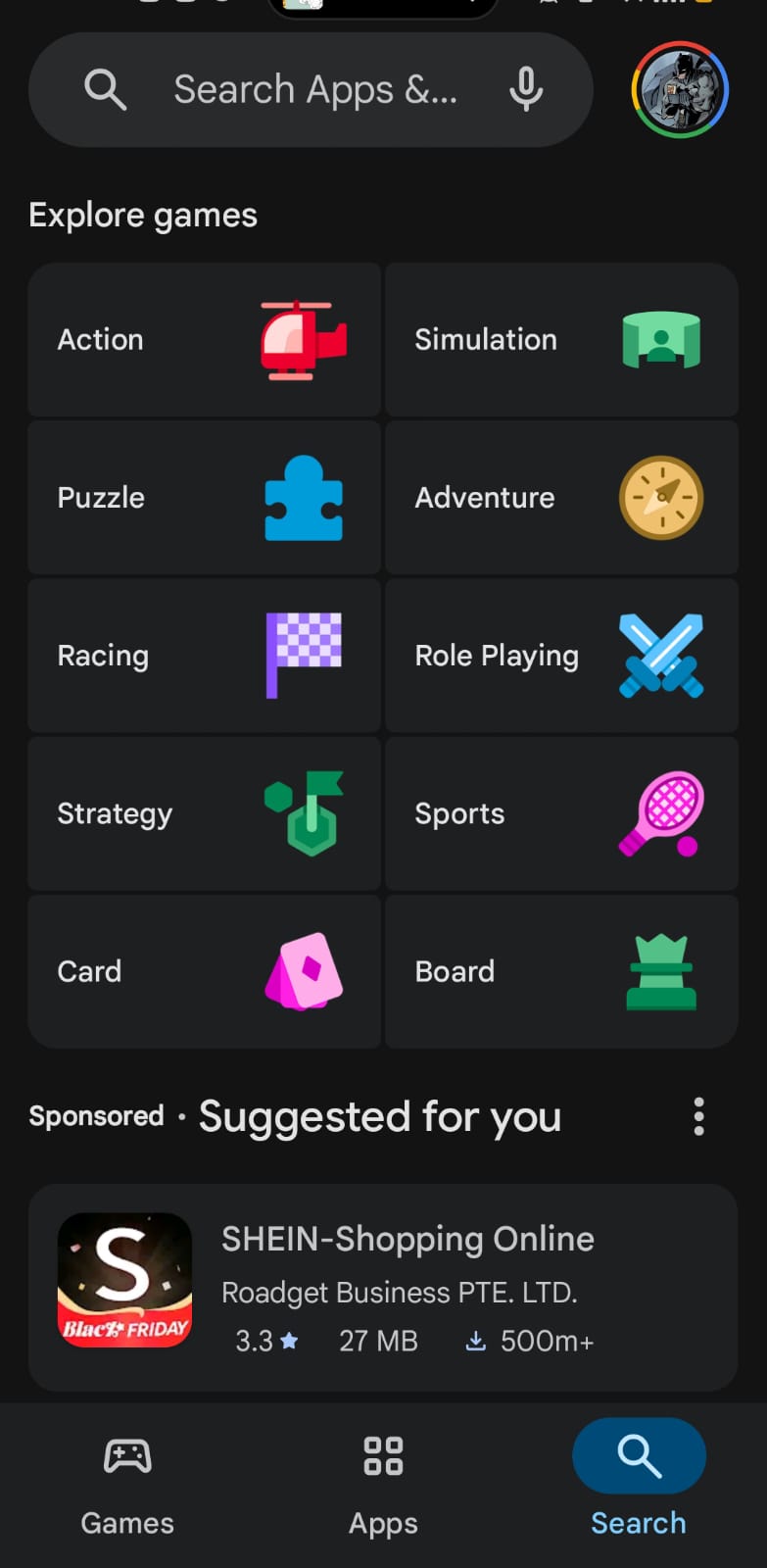
Step 1: Open the Play Store or App Store, depending on your device, to get started.
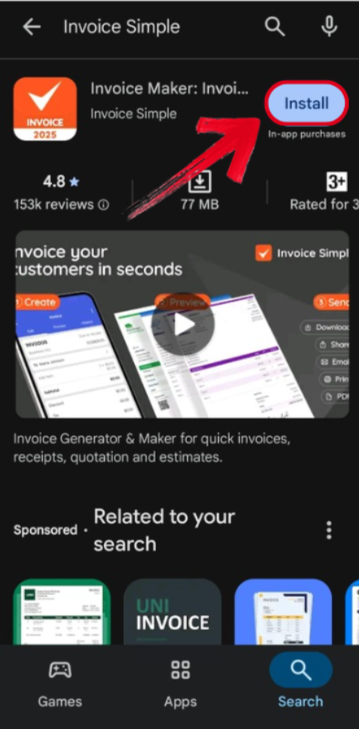
Step 2: Search for “Invoice Simple” on your Play Store and press Install.
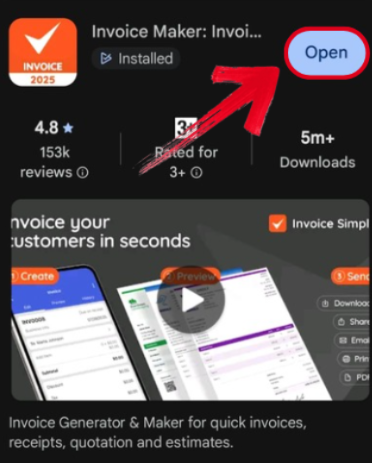
Step 3: Once the installation is complete, simply press Open to launch the app and start generating your invoices.
Best Alternative – Generate Invoice With Professional Free Invoice Generator
Invoice Simple can be a great tool to use to make your finance management easier, but it can be quite limiting in terms of features and pricing. I personally rely on better Invoice Simple alternatives like WPS Invoice Generator to ensure a smooth and seamless process, without having to worry about expensive fees or limited features. It provides me with everything I need to ensure a smooth and seamless invoicing experience, all for completely free.
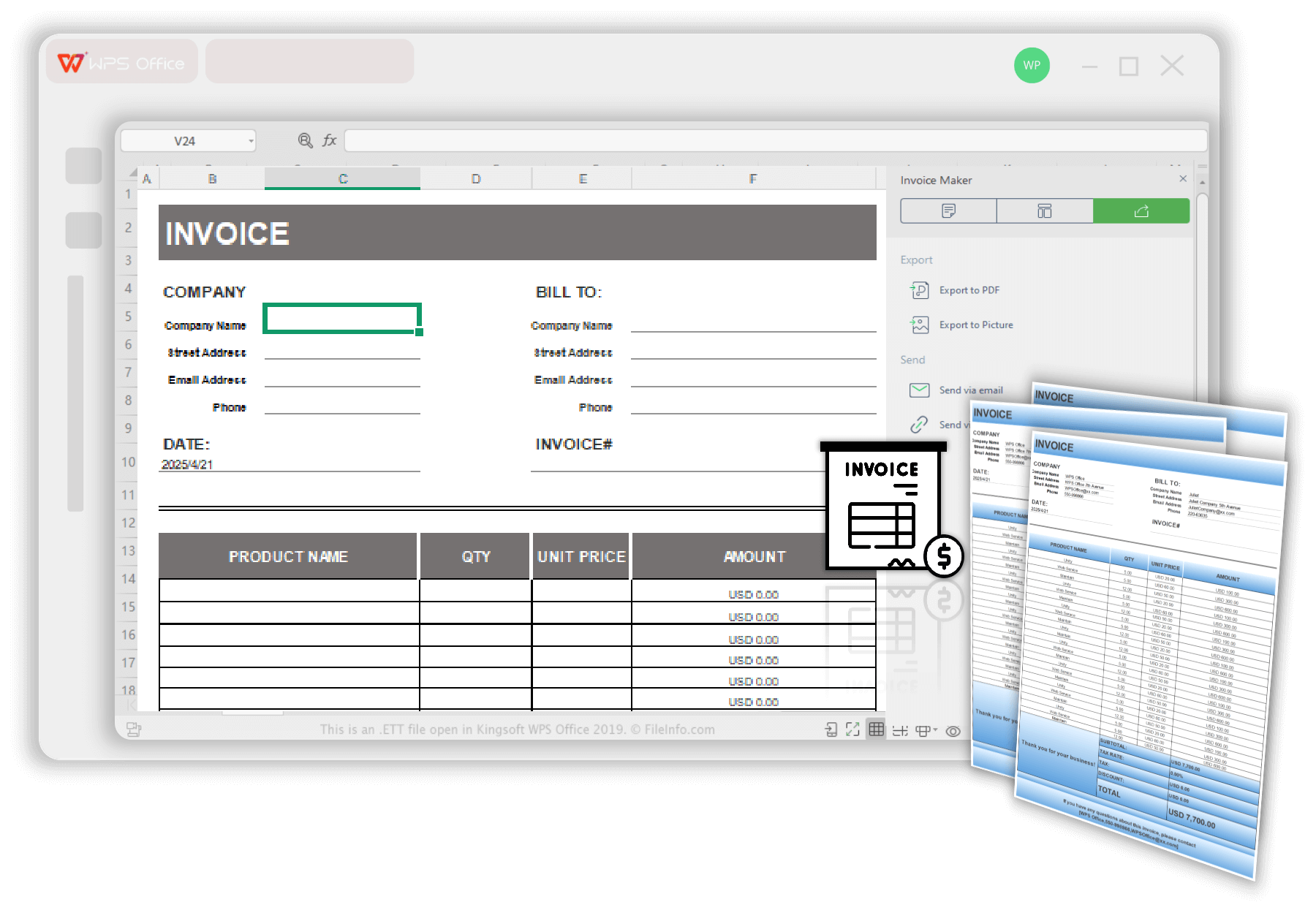
Features
Free and Easy-to-Use: Simple and easy setupprocess.
Professional Templates: Clean, ready-to-send invoice designs, with many options to choose from.
Customizable Fields: Add company logo, project details, itemized costs, and payment terms, however you like.
Instant Export: Download invoices directly as PDF files or share directly with clients.
Time-Saving: Automatically formats everything so you can focus all your energy on your actual projects.
Pros
Completely free
User-friendly and intuitive
Variety of customizable templates
Fast processing speeds
Cons
Lacks advanced invoicing tools
How to Use WPS Free Invoice Generator
WPS Invoice Generator allows you to create any invoice you want in just a few simple steps. I’ll walk you through the entire process step by step, making sure you don’t feel lost along the way.
Step 1: Open your invoice template in WPS Office to get started.
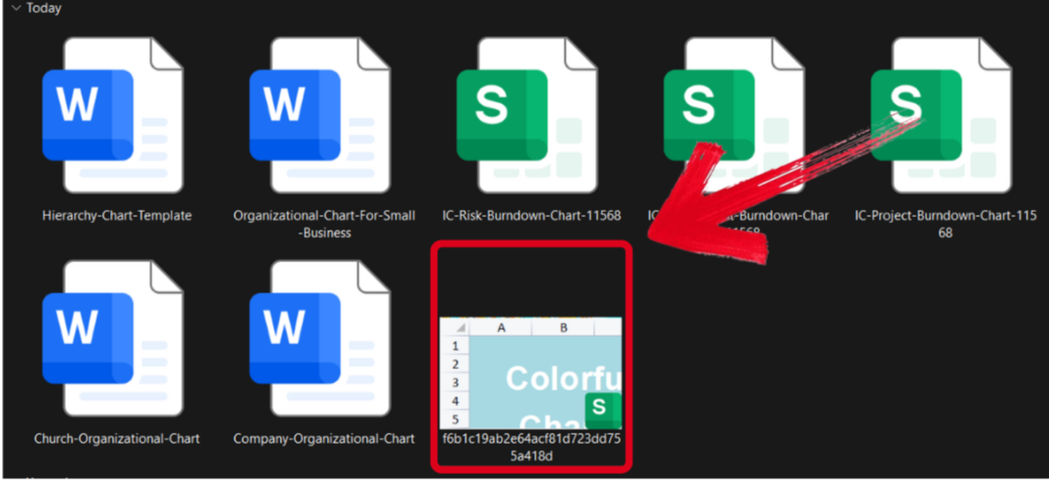
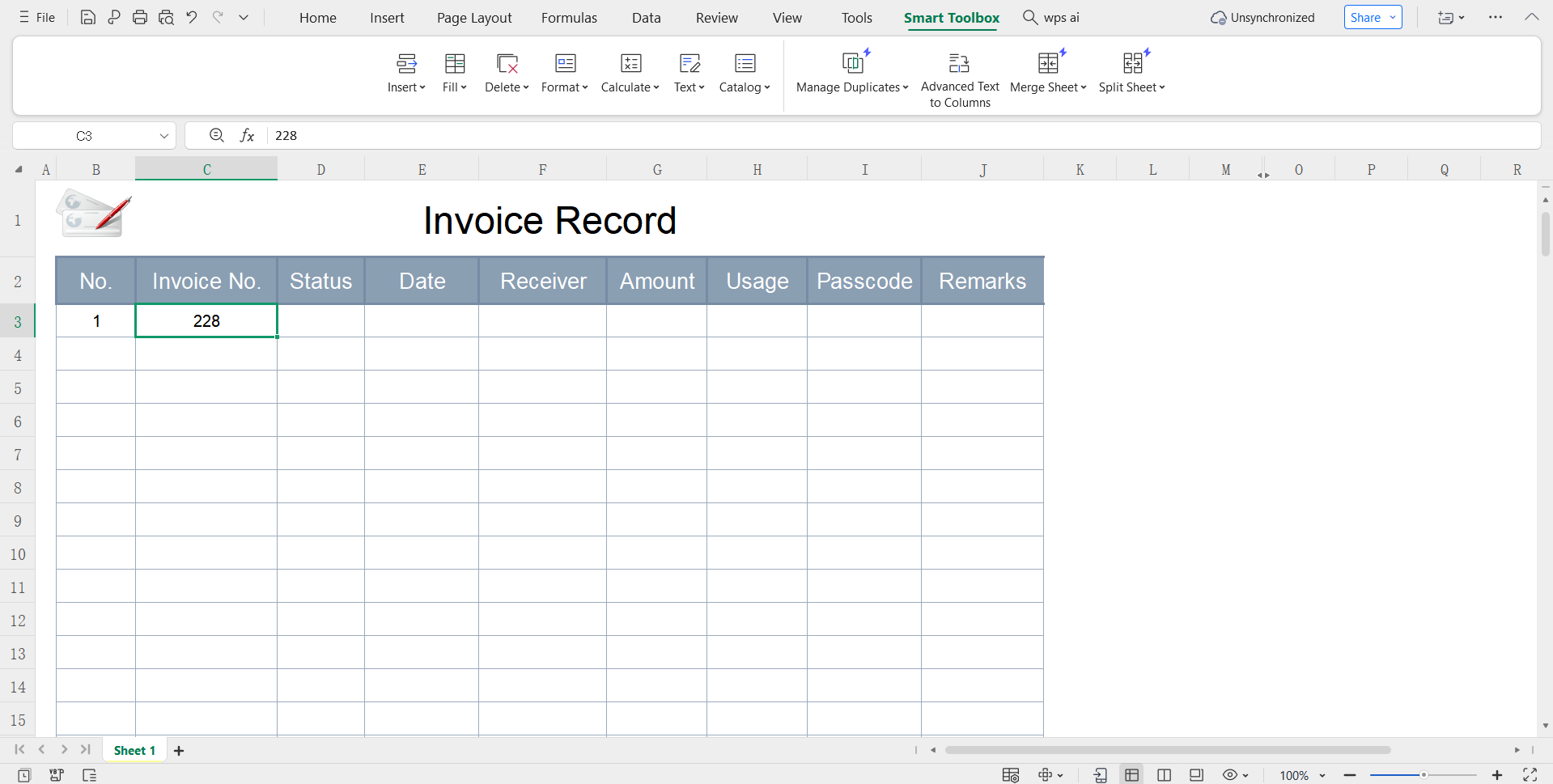
Step 2: Edit the template and add your own billing and project details for your construction work.
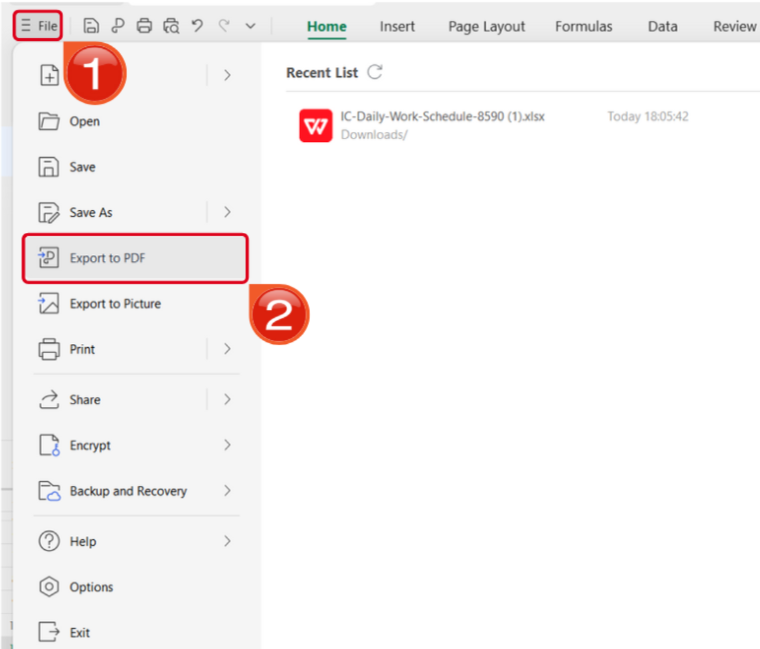
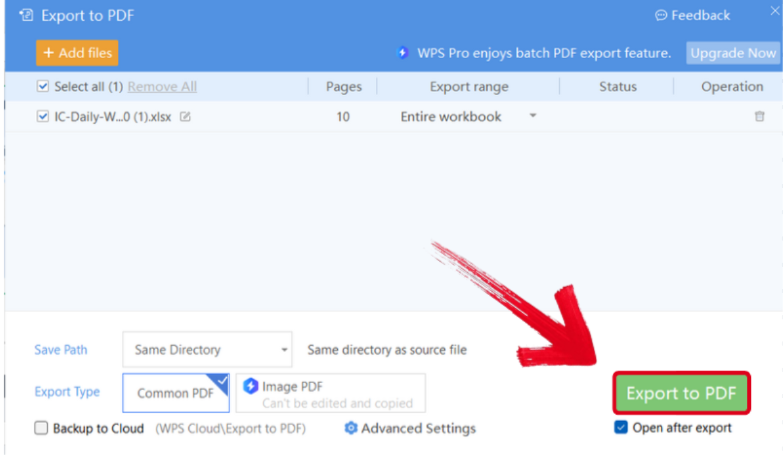
Step 3: Open the Files menu and select Export to PDF to convert your template to a PDF document.
Step 4: Your Excel file will now start conversion into a PDF file. Press Export to PDF to save it to your device.
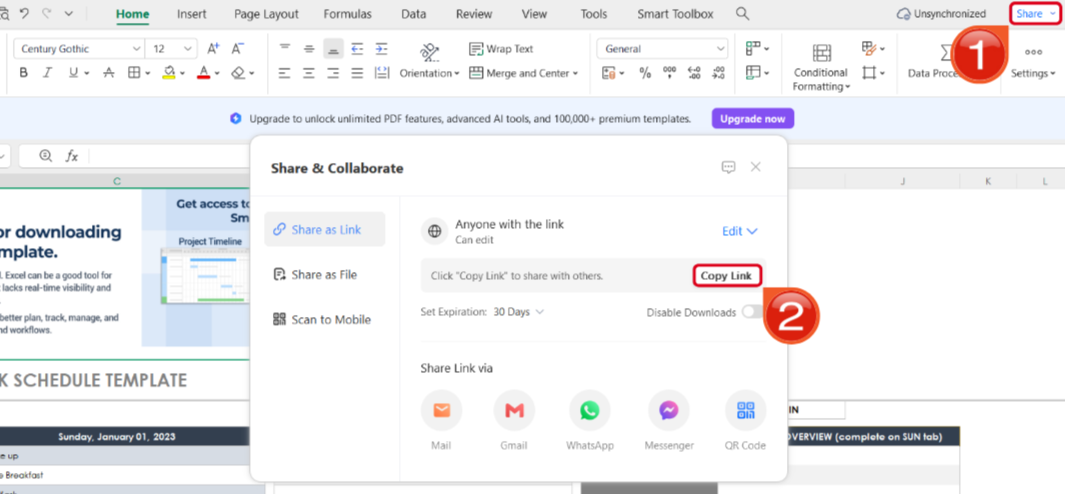
Step 5: Once you’re done saving it as a PDF, pressShare to generate an online link for your file. Then press Copy Link to copy it to your clipboard and share it with others.
WPS Free Invoice Generator V.S. Invoice Simple
Both of the tools I’ve covered have been thoroughly tried and tested by me and have proved to be incredibly reliable in helping me manage my finances more effectively. However, if you’re confused between the two and don’t know which would be a better option for you, don’t worry. In this section, I’ll compareboth of these tools side by side to help you evaluate the unique strengths of each and decide the right option for your requirements.
| Feature | Professional Free Invoice Generator | Invoice Simple |
|---|---|---|
| Pricing Model | Completely Free | Freemium Model |
| Data Handling | No Data Storage | Stores Invoices and Client Data |
| Primary Use | Quick, one-time invoicing | Ongoing Invoice Management |
| Ease of Use | Instant and effortless | Requires account creation and login |
| Advanced Tracking | No Tracking | Robust Tracking Features with Payment Reminders |
| Platform | Web-Based | Mobile App for iOS/Android with an optional web version |
WPS Invoice Generator is my personal go-to when it comes to regular transactions, standing out for its quick and completely free invoicing process. Moreover, the fully web-based functionalityallows me to access my work no matter where I am, which is a big advantage for me.
FAQs
Q1. Does Invoice Simple let me accept online payments?
Yes. Invoice Simple integrates with payment gateways such as Stripe and PayPal, so clients can pay directly using a credit card or their PayPal account.
Q2. Can I customize the invoice template in Professional Free Invoice Generator?
Yes. You can upload your logo, edit field labels, choose different currencies, and fully personalize the overall invoice design.
Q3. What file format are the invoices downloaded in on Professional Free Invoice Generator?
Invoices are generated as high quality PDF files. This ensures your invoice appears professional on any device and is easy to print or send to clients.
Q4. Does Invoice Simple save my invoice history?
Yes. Invoice Simple stores your invoices inside your user account so you can access, manage, and track your full invoice history at any time.
Q5. Is sign up required to use Professional Free Invoice Generator?
No. You can create and download invoices immediately without creating an account or signing in.
Streamlining Invoice Management
Invoice Simple is one of the most reliable options available when it comes to dealing with your finances and generating estimates. In this detailed Invoice Simple review, I’ve broken down its key features, along with a step-by-step guide of its download process to help you get started immediately. If you’re looking for something more universal for your workflow, WPS Invoice Generator is one of the best options out there. It’s completely free and gives you all the features you need to streamline your workflow seamlessly.


