
'%3e%3cpath%20fill-rule='evenodd'%20clip-rule='evenodd'%20d='M19%208.5C24.799%208.5%2029.5%2013.201%2029.5%2019C29.5%2024.6782%2024.9928%2029.3036%2019.361%2029.4939L19%2029.5C18.8794%2029.5%2018.7592%2029.498%2018.6396%2029.4939L18.2811%2029.4758C12.8174%2029.1063%208.5%2024.5574%208.5%2019C8.5%2013.201%2013.201%208.5%2019%208.5ZM22.3063%2010.6267L22.2342%2010.6539C21.3423%2011.0061%2020.5541%2011.6368%2020.5606%2012.4987C20.5631%2012.8302%2020.869%2014.8871%2020.2141%2014.8486C19.5589%2014.8102%2019.413%2013.8753%2018.7116%2013.616C17.5944%2013.2026%2016.9819%2014.3401%2017.0939%2015.3106C17.1695%2015.9655%2018.9289%2018.3871%2017.9028%2019C17.292%2019.3651%2015.7279%2017.5692%2015.1007%2017.1842C14.4805%2016.8034%2013.2758%2017.3333%2012.4974%2016.7029C11.9874%2016.2899%2012.3881%2014.4098%2012.2786%2013.8372C12.2271%2013.5698%2012.1155%2013.3689%2011.9794%2013.2166L12.0402%2013.2934C10.7653%2014.8464%2010%2016.8339%2010%2019C10%2023.8465%2013.8307%2027.7982%2018.6295%2027.9925L18.6769%2027.9747C18.8597%2027.8677%2019.0394%2027.7557%2019.216%2027.6387C19.4137%2027.4534%2019.5436%2027.2072%2019.5849%2026.9394C19.8806%2025.1222%2018.3616%2025.4302%2017.9367%2024.5622C17.5489%2023.7695%2018.5712%2023.7684%2018.5524%2021.7923C18.4607%2021.1774%2018.5279%2020.547%2018.7211%2020.0315C19.1834%2018.7987%2020.7077%2017.2643%2022.5889%2018.0081C23.5567%2018.3906%2023.1524%2019.9831%2023.4737%2020.3394C24.251%2021.2018%2025.3228%2020.6863%2026.2856%2021.2253C26.7816%2021.5032%2026.9797%2022.41%2027.056%2023.2248L27.038%2023.0528C27.6534%2021.8348%2028%2020.4579%2028%2019C28%2015.1968%2025.6409%2011.9445%2022.3063%2010.6267Z'%20fill='%23757575'/%3e%3ccircle%20cx='19'%20cy='19'%20r='10.125'%20stroke='%23757575'%20stroke-width='2.25'/%3e%3c/g%3e%3cdefs%3e%3cclipPath%20id='clip0_1827_14613'%3e%3crect%20width='24'%20height='24'%20fill='white'%20transform='translate(7%207)'/%3e%3c/clipPath%3e%3c/defs%3e%3c/svg%3e)


You can make ChatGPT write like a human by pasting one short voice prompt before your request, then running a quick edit pass on what comes back. You do not need a 40-rule mega prompt. The models ignore most of those, and we will get to why.
Below are six copy-paste prompts: one master voice prompt, one edit pass, one voice-profile extractor, and three use-case variants for email, blog posts, and essays. Plus a banned-words table and a six-point check for the final draft.
- One compact prompt beats a long one. The model follows a short list of rules far more consistently.
- Feed it 200 words of your own writing and it will copy your rhythm. That step matters more than any single rule.
- Ban the AI-tell words before you draft. Fixing "delve" and "seamless" after the fact takes longer.
- Do not chase AI detector scores. Use the six-point manual check instead; it catches what detectors miss.

The Prompt That Makes ChatGPT Sound Like You
Here is the master prompt. Copy it, paste it into a new chat, and replace the last line with your task.
You are my writing partner. Write the way a thoughtful person talks to a friend about work.

Rules that always apply:
1. Active voice. "Management canceled the meeting," not "The meeting was canceled by management."
2. Address the reader with "you" and "your."
3. Mix short and long sentences. A three-word sentence is fine.
4. Cut filler. If a word adds nothing, remove it.
5. Never open with throat-clearing like "In today's fast-paced world" or "It is important to note."
6. No buzzwords. Banned: delve, elevate, navigate, embark, leverage, seamless, empower, revolutionize, game-changer, unlock, harness, tapestry, testament, landscape, realm.
7. No "It's not just X, it's Y" constructions. State the point once.
8. No rule of three just for rhythm. Three items only when all three earn their place.
9. Contractions where natural: "you'll," "it's," "don't."
10. One idea per paragraph. Short paragraphs.

Here is what I need you to write: [paste your request]
Ten rules is enough. More than that and the model starts dropping the ones it does not like, which is why most humanizer prompts fail. Rules 1, 3, 6, and 10 do about 80% of the work; the rest are insurance.
Why Most "Humanize" Prompts Fail
If you have tried humanizer prompts before, you have probably seen this: you paste a wall of instructions, and the reply still opens with "In today's fast-paced world" or throws in a "delve."
That is instruction dilution. A long list of rules competes for attention, and the model quietly ignores the parts it treats as low priority.
You can watch this happen in a widely shared r/ChatGPT thread from late 2025: the original post lists roughly twenty instructions across voice, sentence structure, word choice, and SEO, and one of the top replies says, with some frustration, that the model ignores it "80% of the time." Other users kept adding fixes in the comments — ban "it's not just X, it's Y," ban buzzwords, drop the rule of three. Each fix is reasonable. Piled into one prompt, they bury each other.
Three changes fix most of it:
- Keep the core list at ten rules or fewer, and put the most important ones first.
- Split the work across two passes: one prompt writes the draft, a second one cleans it. The edit pass below is designed for that.
- Move your ban list to a place the model respects. Put it in ChatGPT's custom instructions (Settings > Personalization > Customize ChatGPT), where it applies to every chat, instead of retyping it each time.
Use this edit pass after any draft:
Editing pass. Rewrite the draft below under these rules: active voice, direct address with "you," mixed sentence lengths, no buzzwords (delve, elevate, navigate, embark, leverage, seamless, empower, revolutionize, unlock, harness, tapestry, testament, landscape, realm), no "It's not just X, it's Y," no throat-clearing openers, contractions where natural. Keep the facts and the structure. Change only the wording.

[paste draft]
The draft-and-edit split is the single biggest reliability upgrade. One prompt that has to invent content and manage style at once does both worse. If rewriting existing text is the whole job, a dedicated ChatGPT rewriter guide covers that path.
Tune It to Your Voice in 3 Minutes
Generic "sound human" rules get you 80% of the way. The last 20% is your voice, and there is a fast way to teach it.
- Find 200-300 words you wrote yourself, with no AI help. An email to a coworker, a social post, a report intro — anything in your natural register.
- Paste it into a new chat with this prompt:
Here is a sample of my writing. Extract a voice profile: my sentence length habits, my contractions, my vocabulary level, how I open and close paragraphs, and anything I do repeatedly. Then rewrite the profile as a short style guide I can reuse in future prompts.

[paste your sample]
- Copy the style guide it returns and append it to the master prompt as "Write in this voice: [style guide]."
- Save both to your custom instructions so every new chat starts human. You update the sample whenever your job or audience changes.
Two cautions. First, use your own writing as the sample. If you feed it AI text, it copies AI habits and you end up right where you started. Second, keep the sample recent. Writing voice drifts; a sample from three jobs ago pulls the tone backward.
Copy-Paste Prompts by Use Case
The master prompt works for anything, but each format has its own tells. These variants add one or two format-specific rules.
You are my writing partner. Write an email the way a busy, competent person writes to a colleague. Rules: active voice, direct address, mixed sentence lengths, contractions, no buzzwords, no throat-clearing opener, one idea per paragraph. Get to the ask by the second sentence.

Write an email about: [situation]. Length: [short/medium].
Blog post or social post
You are my writing partner. Write a [blog post/social post] that sounds like a person explaining something they actually know. Rules: active voice, "you" and "your," mixed sentence lengths, contractions, no buzzwords, no throat-clearing opener, no rule-of-three filler, no "It's not just X, it's Y." Open with the answer or the most interesting fact, not background. One idea per paragraph.

Topic: [topic]. Audience: [audience]. Length: [word count].
Essay or application
You are my writing partner. Write in a measured first-person voice, like someone reflecting honestly. Rules: active voice, mixed sentence lengths, contractions where natural, no buzzwords, no inflated claims, no "In today's fast-paced world" or "It is important to note." One idea per paragraph. Support every claim with a specific example. Do not list achievements like a resume; show one moment and what it taught me.

Prompt: [essay question or application prompt]. Length: [word count].
The same rules work in any AI writer, not just ChatGPT. In WPS Office, the WPS AI Writer panel gives you starting scenes — brainstorm, outline, blog post, social media post — and you can paste the master prompt into the same panel before picking a scene, so the draft comes out in your voice from the first line.
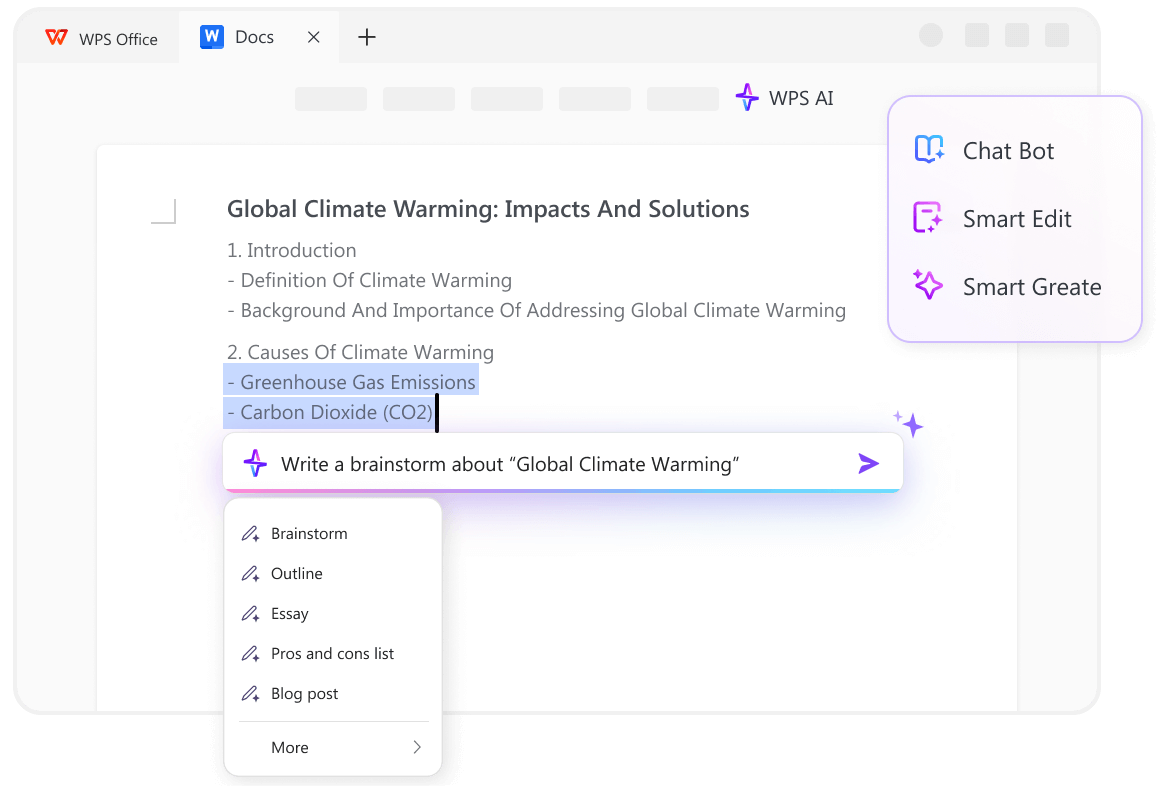
If you draft in WPS Office anyway, you skip the copy-paste step between writing and the document you will actually use. And if your current task is a document review rather than a draft, we also have a set of ChatGPT prompts for reviewing a PDF.
Words That Instantly Mark AI Text
Some words and patterns have become AI fingerprints. A reader may not name them, but they feel them. This table lists the common ones and what to do instead.
| If you see | Problem | Replace with |
|---|---|---|
| "In today's fast-paced world," "In the ever-evolving landscape" | Throat-clearing opener | The actual point, or just delete it |
| "It's not just X, it's Y" | Contrastive negation, an AI favorite | "It's Y." |
| delve, elevate, navigate, embark, leverage, harness, unlock | Buzzword verbs | Plain verbs: look into, raise, handle, start, use, open |
| seamless, robust, game-changer, cutting-edge | Hollow adjectives | Cut them, or say what is actually true |
| tapestry, testament, landscape, realm | Grand nouns | The plain noun you actually mean |
| Moreover, Furthermore, In conclusion | Robotic transitions | Cut; a new paragraph is its own transition |
| "It is important to note," "It's worth mentioning" | Fake precision | Cut, or keep only if the note is genuinely important |
| "Whether you're a beginner or an expert" | Generic audience straddle | Name the real audience |
| Rule-of-three lists ("faster, smarter, better") | Rhythmic filler | One claim that is specific |
Print this table or keep it open while you edit. You will not need it for long. After a few passes you start seeing "delve" from across the room.
The 6-Point Human Check Before You Publish
Detectors exist, but chasing their scores is a trap. The same text can score wildly different results between runs, and human writing gets flagged all the time. Many professional writers have said this publicly; treat the score as a rough filter, never a verdict. Instead, run the draft through six questions a person can actually answer:
- Read it aloud. Anywhere you stumble is a place a reader will too.
- The colleague test. Would you say this sentence out loud to a coworker? If not, rewrite.
- The contraction scan. Zero contractions in a casual piece is a tell. Add them where they fit.
- The rhythm scan. Three sentences in a row with the same length and shape? Break one up.
- The author test. Cover the byline. Would someone who knows you guess you wrote it? If the answer is no, the voice work above needs another pass.
- The detector reality check. If you run one, use it to spot patterns, not to prove anything. A low score is not a publish guarantee, and a high one is not a rejection letter.
If you want to go deeper after the checklist — full humanizer tools, free options, step-by-step comparisons — we have a separate guide on how to humanize AI content and a walkthrough of free AI humanizer tools.
When Not to Humanize
Humanizing is a default, not a rule. Some writing should stay formal, and forcing casual voice into it makes it worse.
Skip or soften these rules for:
- Technical documentation. A step must be exact. "Mix short and long sentences" matters less than "run this command, then check this log."
- Legal and medical writing. Precision beats personality. Keep active voice and plain words; drop the ban on formal transitions.
- Academic writing with citations. Your voice shows in the argument and the examples, not in contractions.
If you work across both styles, save two custom instruction sets in ChatGPT and switch between them, or keep the casual rules in the prompt only when you need them.
One more way to make this stick: build the habit in a real document. Draft in WPS Office with WPS AI, apply the master prompt there, and keep the banned-words table in a note inside the same document. The prompt improves the draft; the table guards the edit. Together they beat any single humanizer tool you will find.
Frequently Asked Questions
What is the best prompt to make ChatGPT write like a human?
A short master prompt with ten hard rules: active voice, "you" address, mixed sentence lengths, a banned-words list, and a ban on throat-clearing openers and "It's not just X, it's Y." The full copy-paste version is in the first section. Long prompt lists perform worse because the model ignores most of them.
Can ChatGPT's output pass AI detectors?
Not reliably, and the same is true in reverse: detectors flag human writing too, and scores swing between runs. Treat a detector as a rough pattern-spotter and run the six-point human check instead. If a stakeholder requires a number, run it once, record it, and move on.
Does this work in the free version of ChatGPT?
Yes. The prompts and the draft-and-edit split need no paid features. Custom instructions exist on free accounts as well, though the exact settings path can change, so look for Personalization in the settings menu.
Can I use these prompts in other AI tools?
Yes. The rules are model-agnostic. They work in Claude, Gemini, and in WPS AI inside WPS Office, where the Writer panel offers brainstorm, outline, and blog post scenes you can pair with the master prompt.
How do I make ChatGPT remember my voice in every chat?
Add the master prompt and the style guide from your voice sample to ChatGPT's custom instructions (Settings > Personalization > Customize ChatGPT). Every new chat starts with your voice rules already loaded, so you can skip re-pasting.
The Bottom Line
You do not need a humanizer tool or a four-page prompt to get human writing out of ChatGPT. You need a ten-rule prompt, a sample of your own writing, a banned-words table, and six honest questions before you hit publish. The draft-and-edit split does the rest.
Start with the master prompt at the top, run your next email through it, and you will see the difference in the first reply. If you would rather write where your work lives, download WPS Office free and pair WPS AI with the same prompt inside your documents.
Also Read:
- 1. Gemini AI Photo Prompts for Girls: 10 Copy & Paste Prompts for Stunning, Aesthetic Portraits
- 2. Best ChatGPT Prompts for Every Task: 100+ Copy-and-Paste Prompts
- 3. 11 ChatGPT Prompts for Reviewing a PDF (Copy-Paste, by Task)
- 4. Copy & Paste AI Prompts for a Family of 4: 10 Prompts for a Perfect Family Portrait
- 5. ChatGPT Rewriter in 2026: How to Paraphrase Like a Human
- 6. The Best Prompt for ChatGPT to Write Like a Human (Copy & Paste)



AI enthusiast with 10 years in tech and writing. Follow me for the latest insights on AI trends and tools to boost your writing, workplace efficiency, and productivity!