
'%3e%3cpath%20fill-rule='evenodd'%20clip-rule='evenodd'%20d='M19%208.5C24.799%208.5%2029.5%2013.201%2029.5%2019C29.5%2024.6782%2024.9928%2029.3036%2019.361%2029.4939L19%2029.5C18.8794%2029.5%2018.7592%2029.498%2018.6396%2029.4939L18.2811%2029.4758C12.8174%2029.1063%208.5%2024.5574%208.5%2019C8.5%2013.201%2013.201%208.5%2019%208.5ZM22.3063%2010.6267L22.2342%2010.6539C21.3423%2011.0061%2020.5541%2011.6368%2020.5606%2012.4987C20.5631%2012.8302%2020.869%2014.8871%2020.2141%2014.8486C19.5589%2014.8102%2019.413%2013.8753%2018.7116%2013.616C17.5944%2013.2026%2016.9819%2014.3401%2017.0939%2015.3106C17.1695%2015.9655%2018.9289%2018.3871%2017.9028%2019C17.292%2019.3651%2015.7279%2017.5692%2015.1007%2017.1842C14.4805%2016.8034%2013.2758%2017.3333%2012.4974%2016.7029C11.9874%2016.2899%2012.3881%2014.4098%2012.2786%2013.8372C12.2271%2013.5698%2012.1155%2013.3689%2011.9794%2013.2166L12.0402%2013.2934C10.7653%2014.8464%2010%2016.8339%2010%2019C10%2023.8465%2013.8307%2027.7982%2018.6295%2027.9925L18.6769%2027.9747C18.8597%2027.8677%2019.0394%2027.7557%2019.216%2027.6387C19.4137%2027.4534%2019.5436%2027.2072%2019.5849%2026.9394C19.8806%2025.1222%2018.3616%2025.4302%2017.9367%2024.5622C17.5489%2023.7695%2018.5712%2023.7684%2018.5524%2021.7923C18.4607%2021.1774%2018.5279%2020.547%2018.7211%2020.0315C19.1834%2018.7987%2020.7077%2017.2643%2022.5889%2018.0081C23.5567%2018.3906%2023.1524%2019.9831%2023.4737%2020.3394C24.251%2021.2018%2025.3228%2020.6863%2026.2856%2021.2253C26.7816%2021.5032%2026.9797%2022.41%2027.056%2023.2248L27.038%2023.0528C27.6534%2021.8348%2028%2020.4579%2028%2019C28%2015.1968%2025.6409%2011.9445%2022.3063%2010.6267Z'%20fill='%23757575'/%3e%3ccircle%20cx='19'%20cy='19'%20r='10.125'%20stroke='%23757575'%20stroke-width='2.25'/%3e%3c/g%3e%3cdefs%3e%3cclipPath%20id='clip0_1827_14613'%3e%3crect%20width='24'%20height='24'%20fill='white'%20transform='translate(7%207)'/%3e%3c/clipPath%3e%3c/defs%3e%3c/svg%3e)


TikTok’s active status spills the tea on when you’re online, but sometimes you just wanna vibe without your friends knowing you’re scrolling at 3 AM. Digging through settings to hide that green dot can feel like a wild chase. How do you turn off active status to keep your TikTok game low-key? This guide’s got super easy steps to stay stealthy, plus a dope tool to save videos for offline fun. Let’s keep your TikTok vibes private and chill!
Why You Might Want to Turn Active Status Off
Active status on TikTok shows a green dot to your followers or mutuals when you’re online or were recently active, kinda like Messenger’s vibe. It’s great for connecting, but it can cramp your style if you want privacy. I turned mine off to dodge late-night “You up?” DMs from nosy friends.
Hiding your status lets you scroll without distractions, like friends blowing up your inbox when you’re just chilling with cat videos. It’s also clutch for keeping things private if you’re avoiding someone or just want space. My cousin switched it off to browse without her boss noticing her TikTok obsession.
It’s not about being shady—it’s about owning your space. Some folks feel pressure to reply ASAP when their status shows they’re online. Turning it off gives you freedom to engage when you’re ready. I felt so much more relaxed after disabling mine, just vibing without expectations.
For creators, hiding active status helps you focus on making content instead of answering DMs. It’s a small tweak that makes TikTok feel like your personal playground. I started editing videos without interruptions after turning it off, and my content game got so much stronger.
If you’re in a group chat or have a big following, active status can make you feel watched. Switching it off lets you enjoy TikTok without feeling like you’re on display. I turned it off during a busy week, and it was like a mini-vacation from notifications.
Step-by-Step Guide to Turn Off Active Status on TikTok
Turning off your active status is a total breeze with these steps, all done right in the TikTok app. Here’s how to go full ninja mode.
Step 1: Open the TikTok App
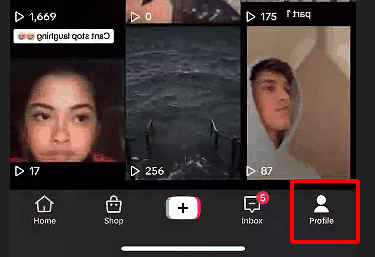
Fire up TikTok on your iPhone or Android and log in. Tap the “Profile” icon in the bottom-right corner to hit your profile. This is your starting point to tweak your settings and keep your online status on the down-low.
Step 2: Head to Settings
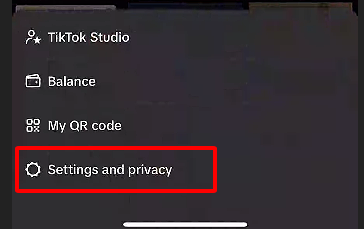
Tap the three-line menu in the top-right corner, then hit “Settings and Privacy.” This is your hub for all things TikTok control, where you can manage what the world sees. I found it super easy to navigate right to the privacy options.
Step 3: Dive into Privacy Settings
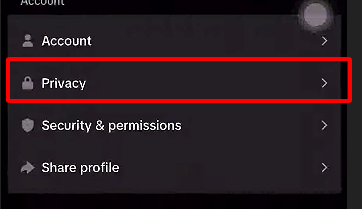
Scroll down and tap “Privacy” to get to the good stuff. This section’s packed with options to control who sees what you’re up to. I zipped straight to it, and the active status setting was right there waiting.
Step 4: Turn Off Active Status
Find “Activity Status” and tap it. You’ll see a toggle switch—slide it off to hide that green dot. I flipped mine off, and boom, no one could tell I was scrolling through dance trends at midnight.
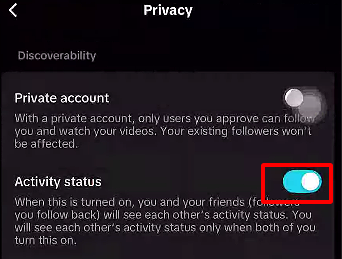
Step 5: Save and Double-Check
The change saves automatically, but ask a friend to check if your status is hidden. I tested mine, and my crew couldn’t see me online—total stealth mode achieved! It’s a quick way to confirm you’re off the radar.
Step 6: Keep Your App Updated
Make sure your TikTok app’s on the latest version, as older ones might hide the option. I had to update mine once when the setting didn’t show up. Check your app store to grab the newest version for smooth sailing.
Extra Tip: This setting’s only in the mobile app, not the web version, so stick to your phone. If you’re not seeing the option, restart the app or clear your cache. I had a glitch once, and a quick restart fixed it.
Turning off active status doesn’t affect your DMs or posts—you can still chat and share like normal. I kept messaging my friends without them knowing I was online, which felt like the best of both worlds!
Enhancing Your TikTok Experience with Toolsmart’s TikTok Video Downloader
Wanna keep your TikTok game fire while staying under the radar? Saving videos for offline vibes or sharing can level up your experience. Toolsmart’s Free TikTok Video Downloader is a straight-up gem, letting you grab public videos in HD without watermarks to enjoy or repurpose (with permission, of course).
This tool’s a lifesaver for creators saving their own TikToks to edit for Instagram or YouTube, or for studying trending clips to nail your style. I downloaded my viral lip-sync video to tweak for Reels, and my Instagram followers went wild! It’s perfect for offline viewing too.
Toolsmart’s all browser-based, so no apps or signups needed—it works on phones, laptops, whatever. I saved a hilarious pet clip to share with my group chat, and it was a total hit. Just make sure to get permission before sharing someone else’s content to keep it legit.
Key Features:
Downloads in 720p or 1080p with no watermarks for clean playback.
No signup or app needed, works on any device.
Saves in MP4 for easy editing and sharing across platforms.
Pros:
Free, fast, and no annoying ads or signup hassles.
Beginner-friendly interface, crisp downloads in seconds.
Cons:
Only grabs public videos, no private clips.
No batch downloads in the free version.
How to Use:
Step 1: Find a public TikTok video and copy its URL via “Share.”
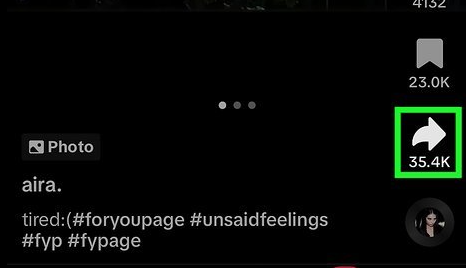
Step 2: Visit Free TikTok Video Downloader (No Watermark)
Step 3: Paste the URL in the input box.
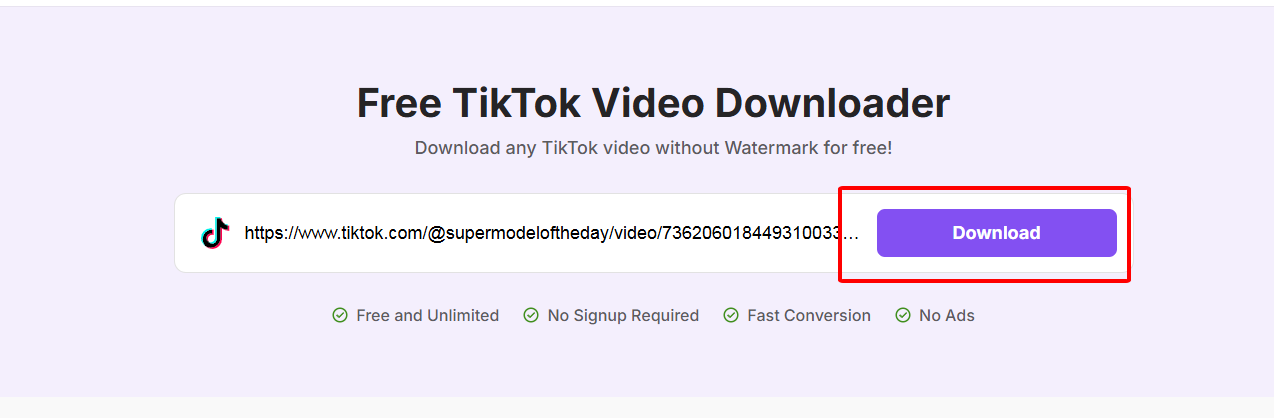
Step 4: Pick quality (720p or 1080p) and click “Download.”
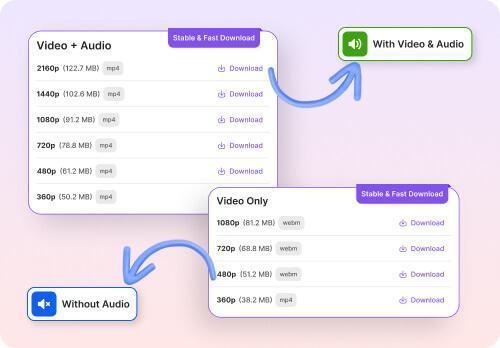
Step 5: Save the video to your device for editing or viewing.
I used Toolsmart to snag a cooking tutorial and edited it for my blog—it was lightning-fast, no watermarks! It’s a must for creators or anyone wanting to save clips for offline fun. Just get permission before sharing someone else’s video!
FAQs
Q1: Will turning off active status stop me from sending or receiving messages?
Nope, it just hides your online status—you can still DM and chat like usual. I turned mine off, and my messages kept flowing without a hitch.
Q2: Can I hide my active status from specific people on TikTok?
Nah, TikTok’s setting is all-or-nothing, not person-specific. I wished I could hide it from my nosy coworker, but it’s everyone or no one.
Q3: Why can’t I find the option to turn off active status on my TikTok app?
Your app might be outdated. Update it in your app store to see the option. I had this issue, and a quick update fixed it.
Q4: Is Toolsmart’s TikTok Video Downloader safe to use?
Yup, Toolsmart’s legit and doesn’t need a login or add watermarks. I’ve used it for months to download videos safely—stick to trusted tools!
Q5: Can I turn off active status on TikTok from the web version?
No, the option’s only in the mobile app for now. I tried on the web, but had to use my phone to make it happen.
Q6: Does turning off active status hide my past activity?
It only hides your current or recent online status, not past posts or interactions. I turned it off, and my old videos stayed visible.
Q7: Can I still go live with active status off?
Totally, going live works fine—it just won’t show you as “online.” I went live after disabling it, and everything ran smoothly.
Summary
Hiding your active status on TikTok is a quick way to keep your scrolling private and your vibes stress-free. Follow our easy app steps to ditch that green dot and control who knows you’re online. Toolsmart’s Free TikTok Video Downloader is a dope bonus, letting you save public videos in HD for offline viewing or editing, no watermarks or signup needed. Keep your TikTok game chill and private!


