How to Link Facebook to Instagram – A Step-by-Step Guide
December 16, 2025276 views
0
Want to save time managing both Facebook and Instagram? Linking your
accounts lets you post once and share everywhere. In this guide, you’ll
learn how to link Facebook to Instagram on your phone, iPad, or
computer, so your content flows smoothly between both platforms. It’s
quick, easy, and ensures your stories, posts, and reels reach the widest
audience.
Link Facebook to Instagram
Part 1: How to Link
Facebook and Instagram
Linking Facebook and Instagram helps you save time, manage messages,
and reach more people with the same post. You can do this either from
the Instagram app or from your Facebook account. Below are two clear
step-by-step methods that show how to link Facebook to Instagram on both
mobile and computer.
On Instagram (Mobile or iPad)
Follow these steps if you prefer linking directly from your Instagram
account.
Step 1: Open the Instagram appon your phone or iPad and log in to your profile.
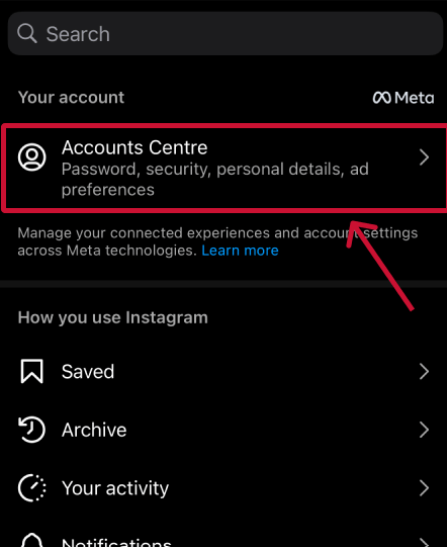
Step 2: Tap the menu icon (three
lines) in the top-right corner, and tap Accounts
Center under “Meta.”
How to link Facebook to Instagram on iPad
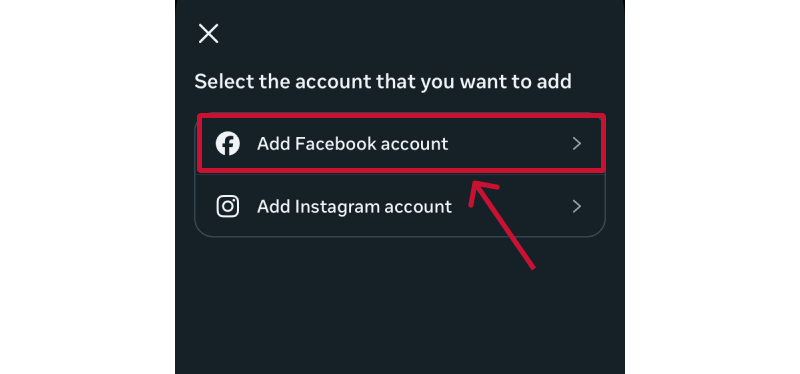
Step 3: Select Add Facebook
Account and sign in to your Facebook profile.
How to link Facebook to Instagram on a phone
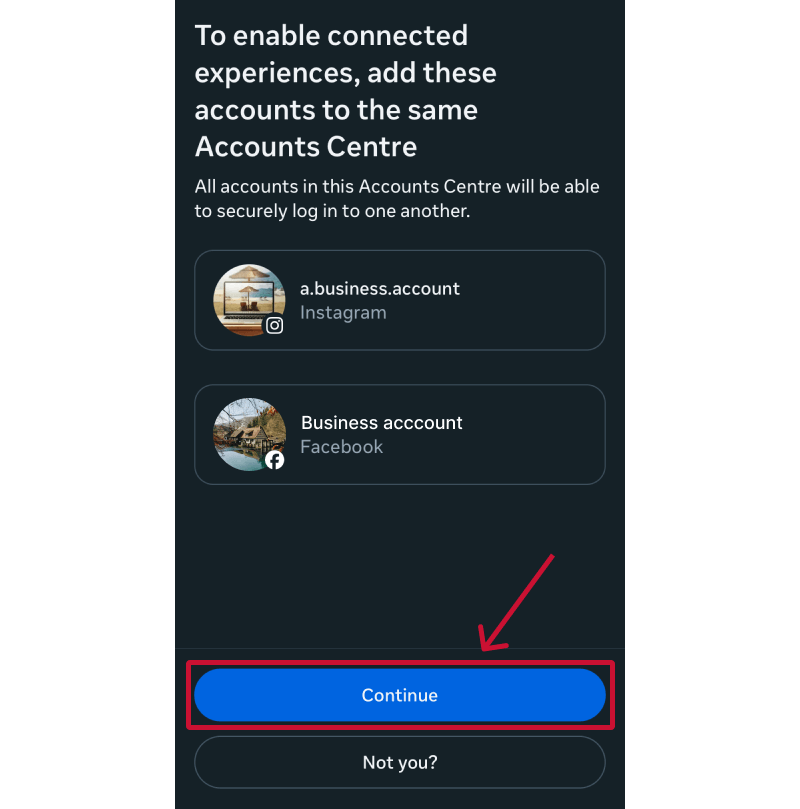
Step 4: Confirm the link by tappingContinue, then choose whether you want to enable
cross-posting for posts or stories.
Click continue to link Facebook to Instagram on iPad
Once connected, you can post a photo or reel on Instagram and share
it automatically to your linked Facebook account. This is the easiest
way for users who mainly manage their social presence through
Instagram.
Tip: If you’re unsure how to connect IG in FB, start
from this method, which automatically links both profiles through Meta’s
Account Center.
On Facebook (Computer or
Mobile Browser)
You can also begin the process from your Facebook account. This
method is especially useful if you manage a Facebook Page for your
brand.
Step 1: Open Facebook on your
computer and click your profile picture in the
top-right corner.
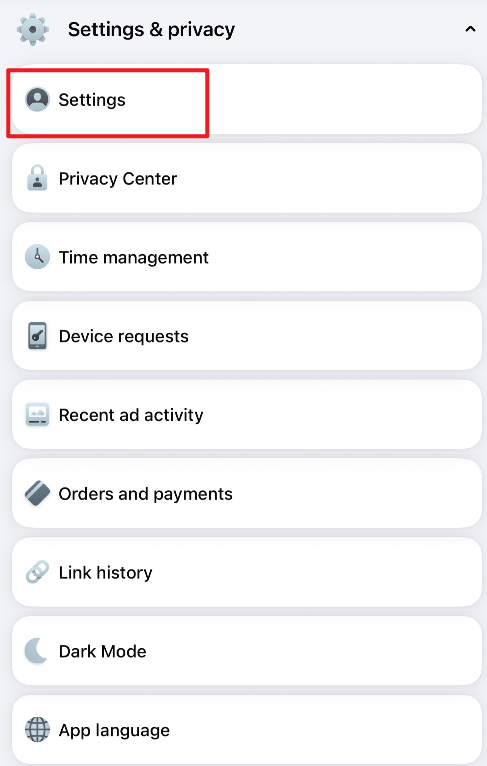
Step 2: Go to Settings & Privacy →
Settings.
How to link Instagram to Facebook
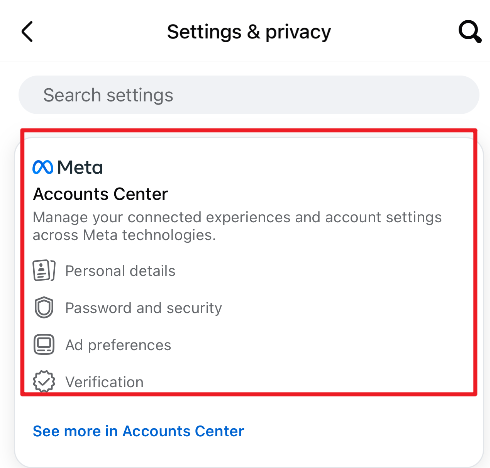
Step 3: Click on Accounts
Center.
How to connect ig to Facebook
Step 4: Add your Instagram account.
This method is ideal if you use a desktop setup or want to ensure
business-level integration between Facebook Pages and Instagram. It also
works if you’re wondering how to link Facebook to Instagram on a
computer or if you’re managing multiple profiles.
Note:
If you face sync issues or don’t see the option to link, try updating
both apps or clearing your cache. Meta frequently updates its interface,
so the location of Accounts Center may slightly vary between app
versions.
Part
2: Bonus Tool – Download Instagram Videos Easily with Toolsmart
After learning how to link a Facebook account to an Instagram
account, many users want to manage or save their cross-posted videos.
However, Instagram doesn’t offer a built-in download option for stories
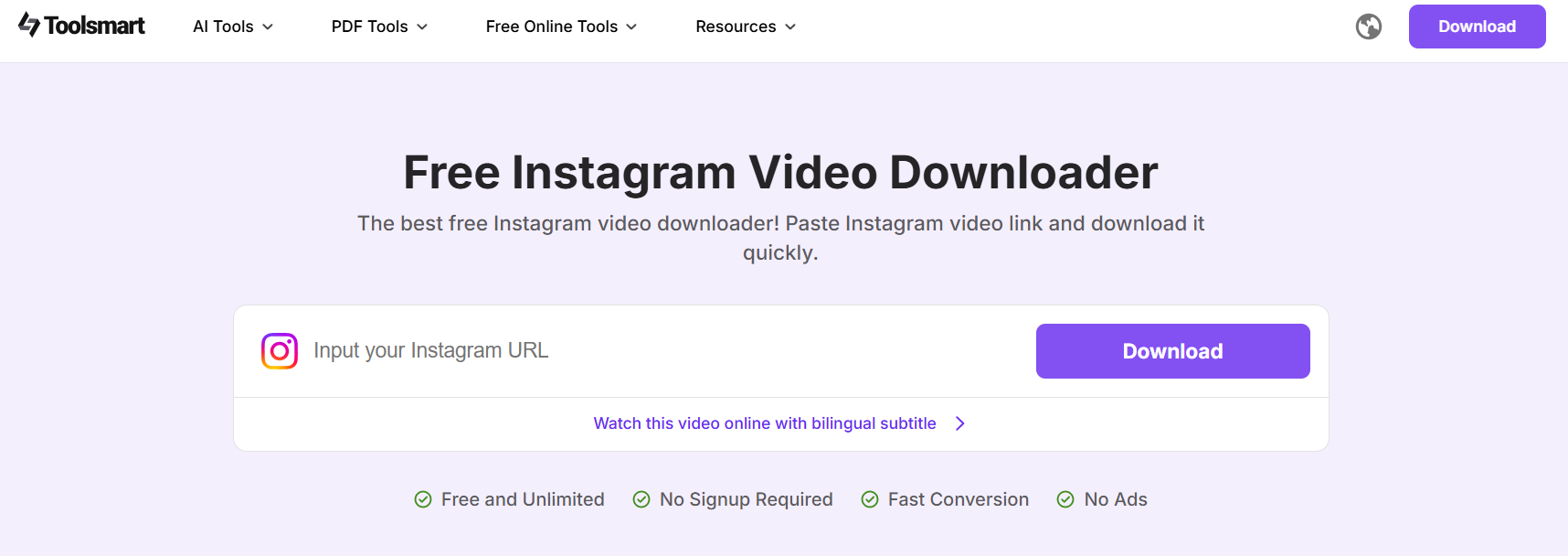
or reels. That’s where the Toolsmart
Instagram Video Downloader comes in; it lets you download any
public Instagram video directly from your browser.
Toolsmart Instagram Video Downloader
Why Use Toolsmart?
Toolsmart is a free, browser-based downloader designed for simplicity
and safety. Unlike many online tools, it doesn’t ask for login
information or display intrusive ads. You just paste the link, click
download, and get your video in seconds.
Key Features:
Works with reels, stories, and posts
Supports HD downloads
No app installation or sign-up required
Compatible with all devices, computer, iPad, or phone
100% safe and malware-free
If you’re looking for a quick way to download Instagram stories or
posts, Toolsmart is one of the easiest and most reliable choices.
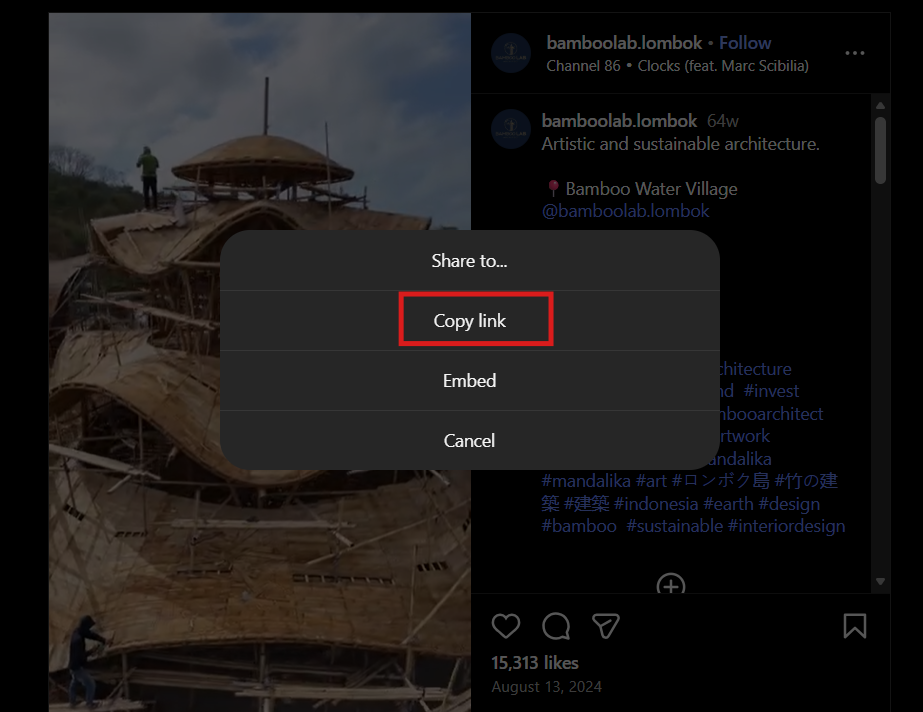
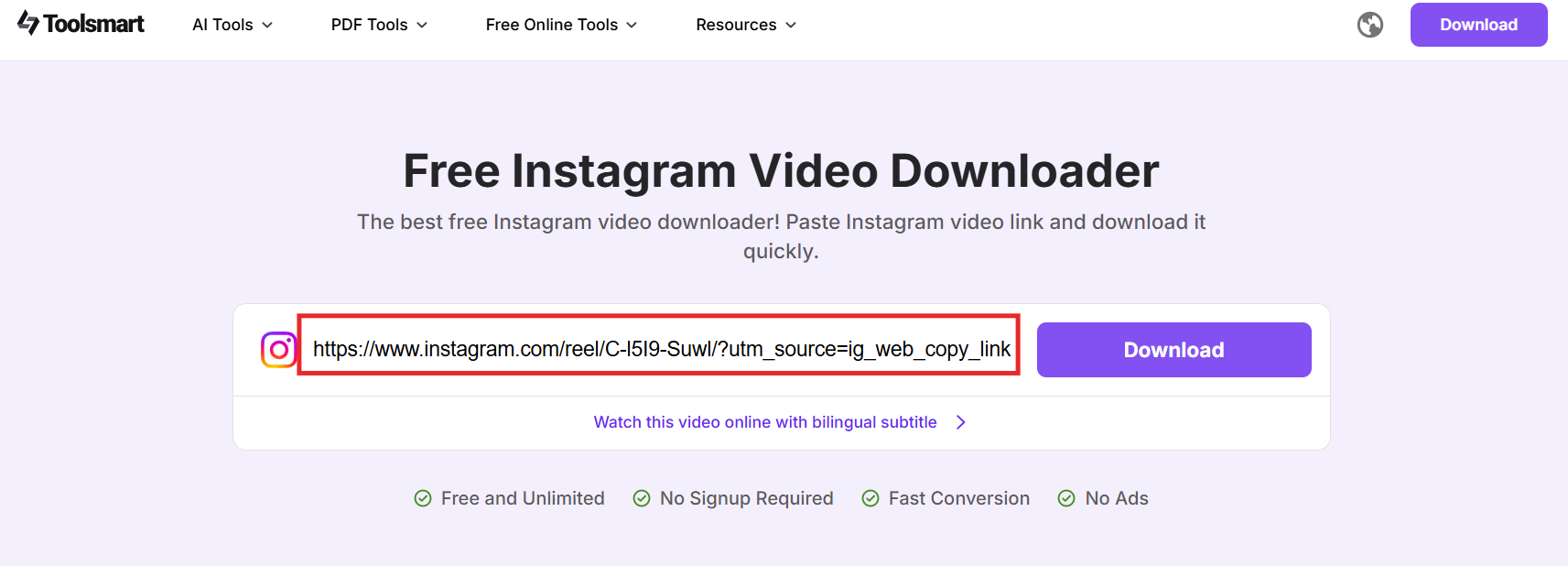
Step 2: Copy the link to the Instagram video,
story, or reel you want to save.
Copy the Instagram Video Link
Step 3: Paste it into the input box on
Toolsmart’s website.
Paste the link in Toolsmart Instagram Video Downloader
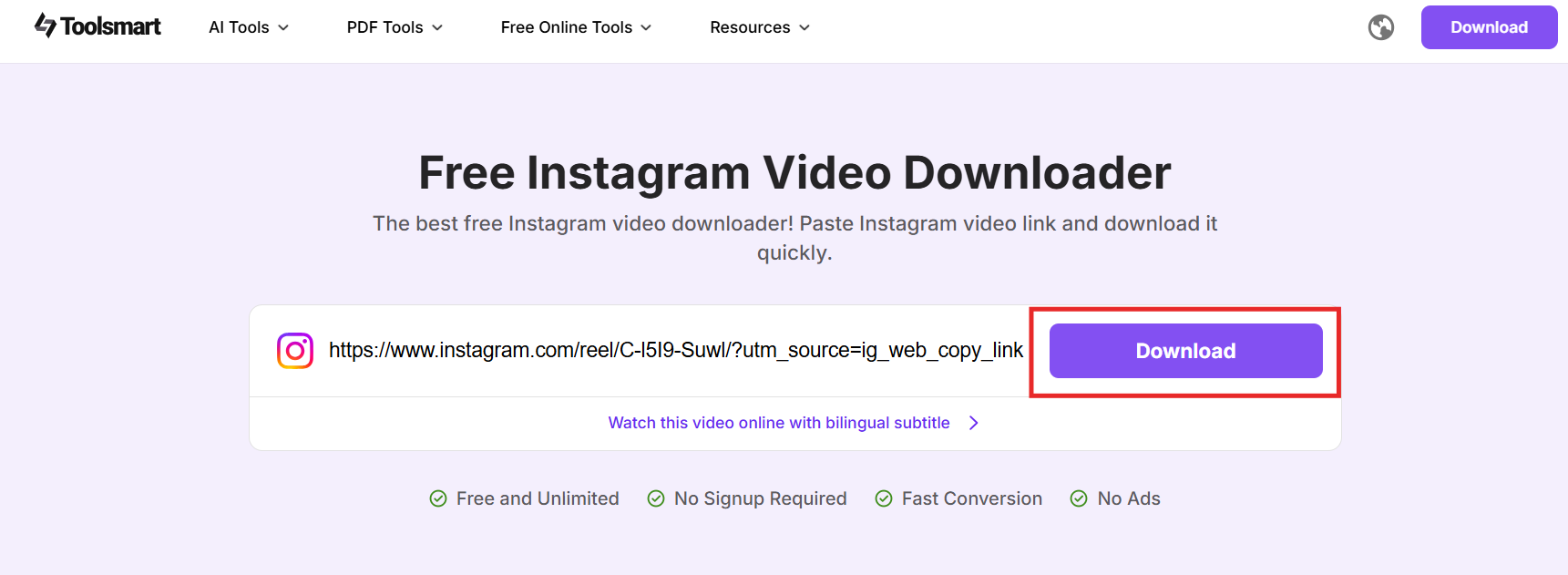
Step 4: Click Download, and the
tool will process the video within seconds.
Click download in Toolsmart Instagram Video Downloader
Step 5: Choose your preferred format or
resolution, then save it to your device.
Tip: If you’re managing social media from your
desktop, this works just as easily as when using it on your phone or
iPad.
My Experience Using Toolsmart
In my experience, Toolsmart stands out for being lightweight and
fast. I’ve used it to download several Instagram videos for content
repurposing and cross-posting to Facebook. Compared to other online
tools, it doesn’t limit download speed or add unnecessary pop-ups. It
also supports downloading Facebook to Instagram stories shared through
cross-posting, which is especially useful for marketers or creators
managing both accounts.
If you’re someone who has just learned how to link Facebook to
Instagram on your phone and want an easy way to save or reuse your
videos, Toolsmart is the perfect companion tool. It turns content
management into a quick, one-click task.
FAQs
Q1: Can I link multiple Instagram accounts to one Facebook
Page?
Yes, you can link multiple Instagram profiles to a single Facebook
Page through Meta’s Accounts Center. However, only one connection can
remain active at a time. If you manage several business accounts, you’ll
need to switch between them manually.
Q2: Will my Instagram followers see my Facebook
content?
Not automatically. Your Instagram audience will only see your
Facebook posts if you enable the “Share to Facebook” setting when
posting on Instagram. After learning how to link Facebook to an
Instagram post, you can choose to share your reels, photos, or stories
directly across platforms.
Q3: Can I download my own or someone else’s Instagram
video?
You can download any public video using free online tools like
Toolsmart Instagram Video Downloader. For private profiles, downloads
are restricted unless you have access to the account. This feature is
useful if you’ve shared Facebook to Instagram stories and want to keep a
copy.
Q4: Is Toolsmart safe?
Yes. Toolsmart is 100% browser-based, which means there’s no need to
log in or install software. It has no hidden ads or malware, making it
one of the safest tools for downloading videos after you link your
accounts.
Q5: Do I need to install anything to use
Toolsmart?
No installation is required. Toolsmart works directly from your
browser on any device, computer, phone, or iPad. Once you’ve mastered
how to link Facebook to Instagram on a computer, you can also use
Toolsmart on the same device to download and manage your content
seamlessly.
Summary
Learning how to link Facebook to Instagram is one of the easiest ways
to simplify content management and grow your online reach. Whether you
connect them from your Instagram app or through Facebook on your
computer, the process takes just a few minutes. Once linked, you can
cross-post reels, stories, and photos effortlessly, ensuring your
audience stays engaged across both platforms.
For creators who also want to save or reuse their content, the Toolsmart
Instagram Video Downloader is an ideal companion. It allows you
to download high-quality Instagram videos, stories, and posts safely and
without installation. Combined with proper account linking, Toolsmart
helps you maintain complete control over your content while making
cross-platform management smooth, efficient, and stress-free.
Khadija Khan is a tech writer who explores office suites and creates content to simplify everyday tools. She teaches and inspires through clear, engaging writing.

'%3e%3cpath%20fill-rule='evenodd'%20clip-rule='evenodd'%20d='M19%208.5C24.799%208.5%2029.5%2013.201%2029.5%2019C29.5%2024.6782%2024.9928%2029.3036%2019.361%2029.4939L19%2029.5C18.8794%2029.5%2018.7592%2029.498%2018.6396%2029.4939L18.2811%2029.4758C12.8174%2029.1063%208.5%2024.5574%208.5%2019C8.5%2013.201%2013.201%208.5%2019%208.5ZM22.3063%2010.6267L22.2342%2010.6539C21.3423%2011.0061%2020.5541%2011.6368%2020.5606%2012.4987C20.5631%2012.8302%2020.869%2014.8871%2020.2141%2014.8486C19.5589%2014.8102%2019.413%2013.8753%2018.7116%2013.616C17.5944%2013.2026%2016.9819%2014.3401%2017.0939%2015.3106C17.1695%2015.9655%2018.9289%2018.3871%2017.9028%2019C17.292%2019.3651%2015.7279%2017.5692%2015.1007%2017.1842C14.4805%2016.8034%2013.2758%2017.3333%2012.4974%2016.7029C11.9874%2016.2899%2012.3881%2014.4098%2012.2786%2013.8372C12.2271%2013.5698%2012.1155%2013.3689%2011.9794%2013.2166L12.0402%2013.2934C10.7653%2014.8464%2010%2016.8339%2010%2019C10%2023.8465%2013.8307%2027.7982%2018.6295%2027.9925L18.6769%2027.9747C18.8597%2027.8677%2019.0394%2027.7557%2019.216%2027.6387C19.4137%2027.4534%2019.5436%2027.2072%2019.5849%2026.9394C19.8806%2025.1222%2018.3616%2025.4302%2017.9367%2024.5622C17.5489%2023.7695%2018.5712%2023.7684%2018.5524%2021.7923C18.4607%2021.1774%2018.5279%2020.547%2018.7211%2020.0315C19.1834%2018.7987%2020.7077%2017.2643%2022.5889%2018.0081C23.5567%2018.3906%2023.1524%2019.9831%2023.4737%2020.3394C24.251%2021.2018%2025.3228%2020.6863%2026.2856%2021.2253C26.7816%2021.5032%2026.9797%2022.41%2027.056%2023.2248L27.038%2023.0528C27.6534%2021.8348%2028%2020.4579%2028%2019C28%2015.1968%2025.6409%2011.9445%2022.3063%2010.6267Z'%20fill='%23757575'/%3e%3ccircle%20cx='19'%20cy='19'%20r='10.125'%20stroke='%23757575'%20stroke-width='2.25'/%3e%3c/g%3e%3cdefs%3e%3cclipPath%20id='clip0_1827_14613'%3e%3crect%20width='24'%20height='24'%20fill='white'%20transform='translate(7%207)'/%3e%3c/clipPath%3e%3c/defs%3e%3c/svg%3e)