
'%3e%3cpath%20fill-rule='evenodd'%20clip-rule='evenodd'%20d='M19%208.5C24.799%208.5%2029.5%2013.201%2029.5%2019C29.5%2024.6782%2024.9928%2029.3036%2019.361%2029.4939L19%2029.5C18.8794%2029.5%2018.7592%2029.498%2018.6396%2029.4939L18.2811%2029.4758C12.8174%2029.1063%208.5%2024.5574%208.5%2019C8.5%2013.201%2013.201%208.5%2019%208.5ZM22.3063%2010.6267L22.2342%2010.6539C21.3423%2011.0061%2020.5541%2011.6368%2020.5606%2012.4987C20.5631%2012.8302%2020.869%2014.8871%2020.2141%2014.8486C19.5589%2014.8102%2019.413%2013.8753%2018.7116%2013.616C17.5944%2013.2026%2016.9819%2014.3401%2017.0939%2015.3106C17.1695%2015.9655%2018.9289%2018.3871%2017.9028%2019C17.292%2019.3651%2015.7279%2017.5692%2015.1007%2017.1842C14.4805%2016.8034%2013.2758%2017.3333%2012.4974%2016.7029C11.9874%2016.2899%2012.3881%2014.4098%2012.2786%2013.8372C12.2271%2013.5698%2012.1155%2013.3689%2011.9794%2013.2166L12.0402%2013.2934C10.7653%2014.8464%2010%2016.8339%2010%2019C10%2023.8465%2013.8307%2027.7982%2018.6295%2027.9925L18.6769%2027.9747C18.8597%2027.8677%2019.0394%2027.7557%2019.216%2027.6387C19.4137%2027.4534%2019.5436%2027.2072%2019.5849%2026.9394C19.8806%2025.1222%2018.3616%2025.4302%2017.9367%2024.5622C17.5489%2023.7695%2018.5712%2023.7684%2018.5524%2021.7923C18.4607%2021.1774%2018.5279%2020.547%2018.7211%2020.0315C19.1834%2018.7987%2020.7077%2017.2643%2022.5889%2018.0081C23.5567%2018.3906%2023.1524%2019.9831%2023.4737%2020.3394C24.251%2021.2018%2025.3228%2020.6863%2026.2856%2021.2253C26.7816%2021.5032%2026.9797%2022.41%2027.056%2023.2248L27.038%2023.0528C27.6534%2021.8348%2028%2020.4579%2028%2019C28%2015.1968%2025.6409%2011.9445%2022.3063%2010.6267Z'%20fill='%23757575'/%3e%3ccircle%20cx='19'%20cy='19'%20r='10.125'%20stroke='%23757575'%20stroke-width='2.25'/%3e%3c/g%3e%3cdefs%3e%3cclipPath%20id='clip0_1827_14613'%3e%3crect%20width='24'%20height='24'%20fill='white'%20transform='translate(7%207)'/%3e%3c/clipPath%3e%3c/defs%3e%3c/svg%3e)


An effective photo slideshow does more than just show images, it brings out feelings, tells a tale, and revives special moments. I've made them, frequently with little time or editing experience, for memorials, birthdays, and client pitches. I discovered that the correct tool has a significant impact on both appearance and feel. The best photo slideshow creators combine impact and simplicity. I'll go over the ones that enabled me to transform a collection of haphazard photos into something special in this guide.

Best Tools for Making Photo Slideshows
When I began experimenting with slideshow videos, I quickly realized how important it is to choose a tool that matches your content style, editing comfort level, and overall goal. The way that slideshowcreators approach design, music integration, and usability varies greatly, ranging from marketing reels to birthday tributes. I investigated what makes each one unique and tested a few of the best-rated ones.
Some prioritise simplicity or branding, while others concentrate more on visual storytelling. I'll walk you through the free photo slideshow creator tools that I found to be the most effective in this section and demonstrate how each one can be incorporated into your own creative process.
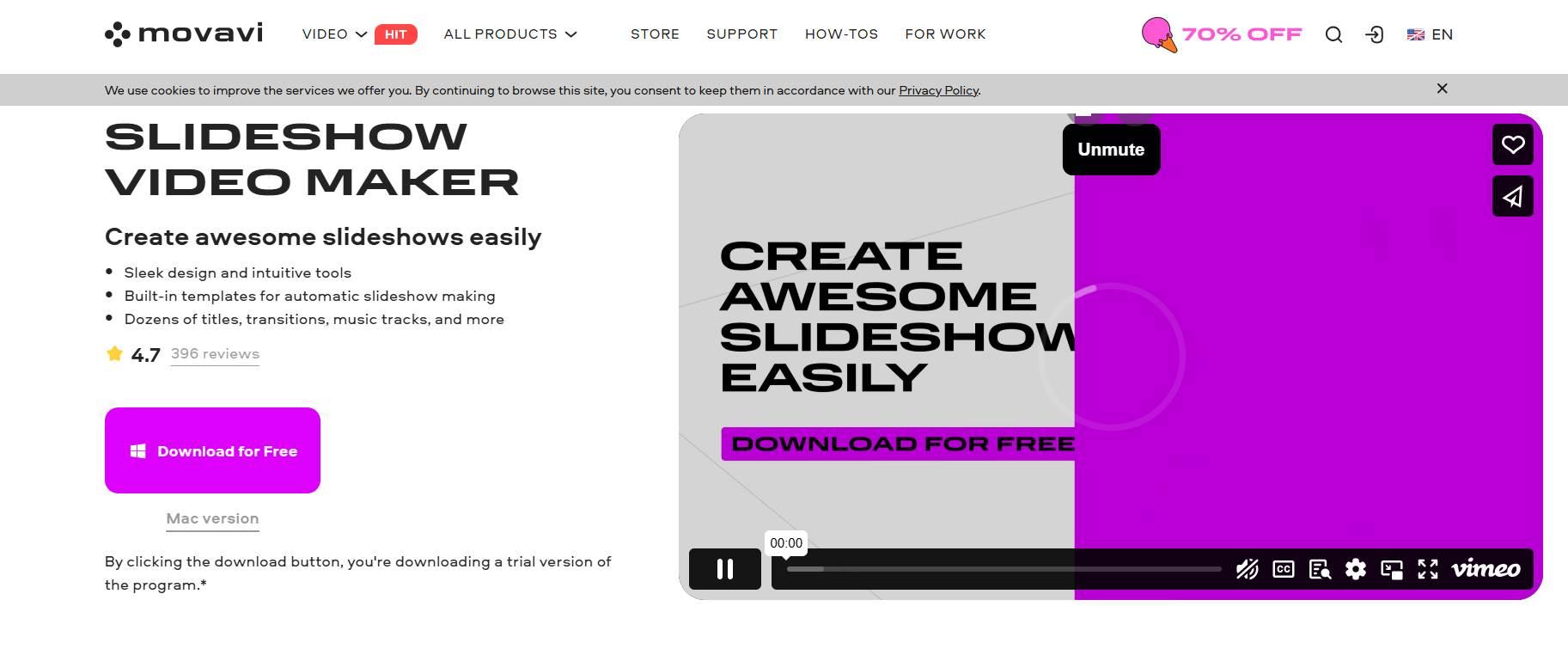
Movavi Slideshow Maker
Finding the right tool can make all the difference when you're pressed for time but still want a slideshow that looks polished and professional. For precisely this reason, Movavi Slideshow Maker was among the first apps I tried, and it soon became a favorite. It was just what I needed for projects that required both style and simplicity, such as family videos, product demos, or brief travel summaries. Even for someone who has little to no editing experience, the interface feels user-friendly. A major benefit was being able to modify timing and fine-tune transitions without becoming bogged down in menus. The final product's smooth appearance and low effort required truly caught me off guard. When a project requires neat, efficient, and expert work, this is
Features:
Offers hundreds of effects, transitions, and animated titles that make your slideshow feel cinematic.
Allows you to add voiceovers, audio tracks, and automatically match visuals to music beats.
Includes timeline editing for precision control.
Exports slideshows in multiple formats, including MP4, MOV, and 4K.
Pros:
Great balance between simplicity and depth.
Supports HD and 4K without lag.
Offers a rich template library.
Cons:
Watermark appears in the free version.
Requires download and installation.
Movavi is excellent for users who want more creative freedom and higher-quality results without dealing with overly complex software.
Here’s some steps to use an online photo video maker like Movavi:
Step 1: Download and install Movavi Slideshow Maker from the official site.
Step 2: Import your photos and audio clips into the project timeline.
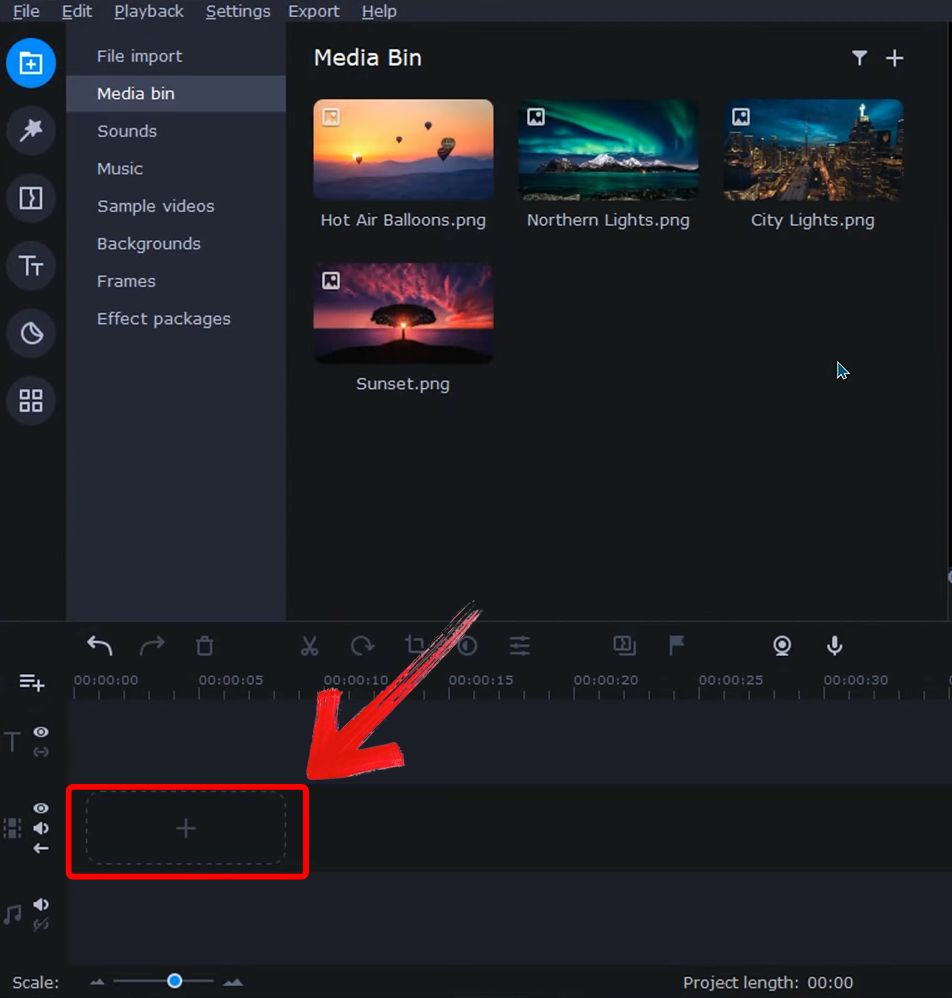
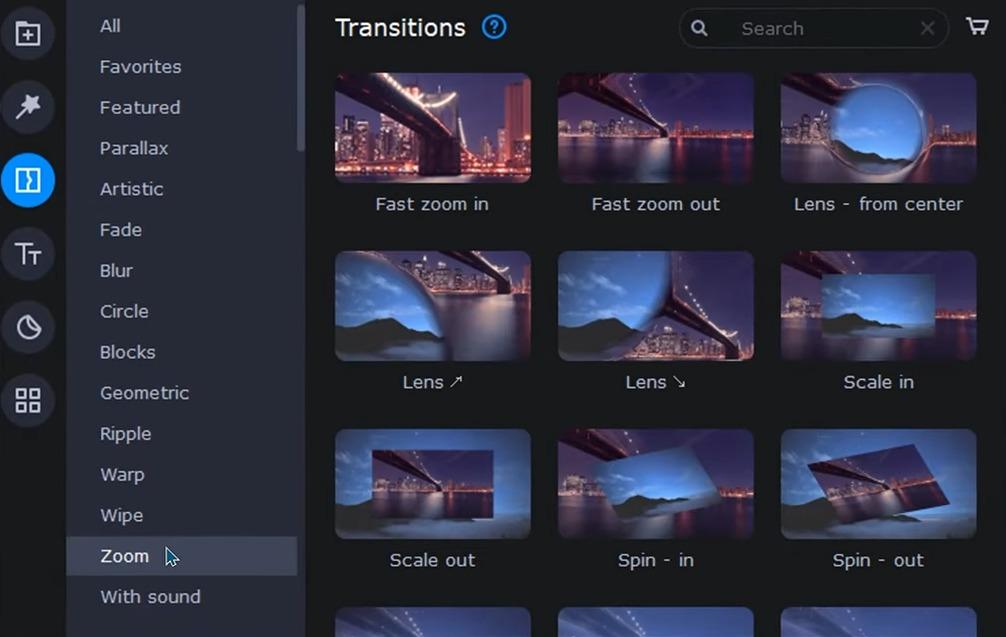
Step 3: Choose a template or manually add effects, text, and transitions.
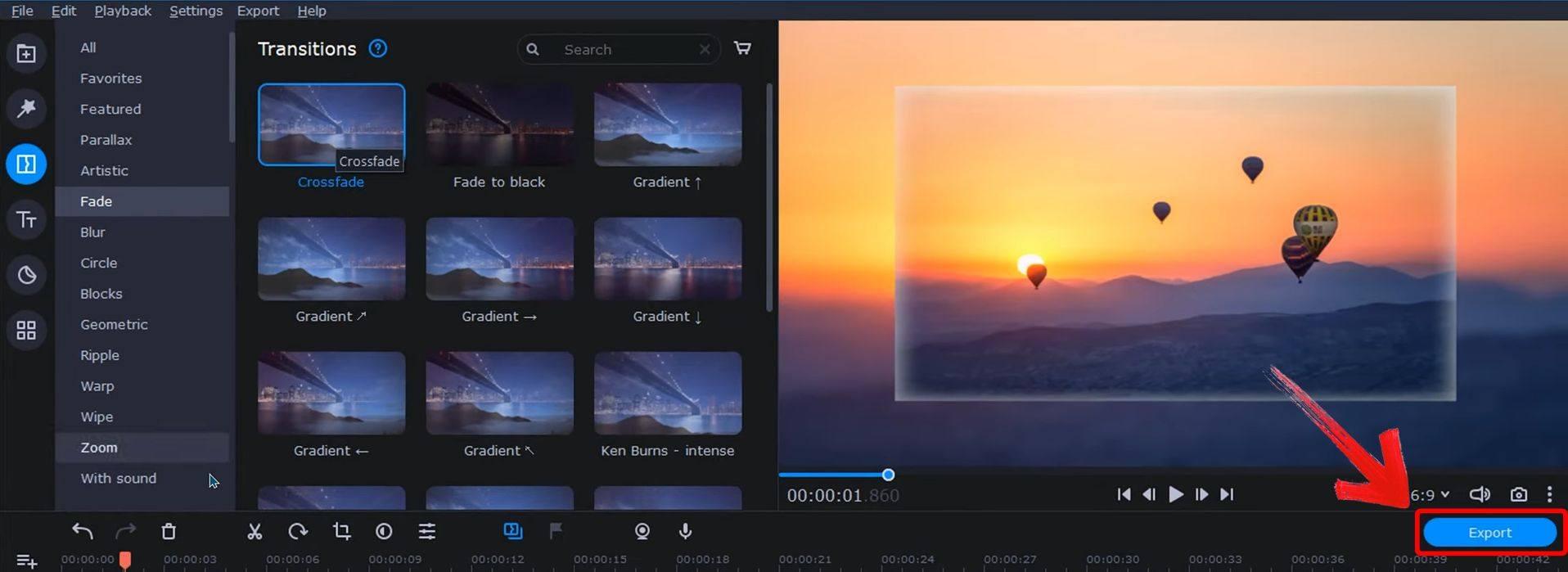
Step 4: Preview your work, make adjustments, andexport to your desired format by clicking on the“Export” button.
I found it reliable and smooth, especially when creating polished slideshows with synced background music.
Photopia
If you want more creative control and the feel of high-end slideshow software without a steep learning curve, Photopia is a great app for you. It allowed me the freedom to go beyond simple templates, and I've used it for everything from creative pitches to tribute reels. Although it felt much more approachable, the layer-based editing reminded me of more sophisticated video tools.
I managed several tracks without getting overwhelmed, experimented with effects, and precisely timed captions. Photopia allowed me to be more involved in more intricate slideshow projects that required refinement and customization while maintaining a manageable workflow.
Features:
Provides precise animation and layer controls, perfect for advanced storytelling.
Supports voiceover recording and captioning directly in the app.
Includes dozens of design templates for events, businesses, or family albums.
Allows you to build both simple and cinematic slideshows.
Pros:
No watermarkin many export settings.
Professional-level tools packaged in a simple interface.
Works online and offline.
Cons:
Steeper learning curve for beginners.
Some advanced features require payment.
Photopia is ideal for anyone who wants full control over their slideshow’s pace, flow, and design.
Here’s some steps to use photo slideshow with music free editor like Photopia:
Step 1: Visit the Photopia website and download the Photopia Creator app
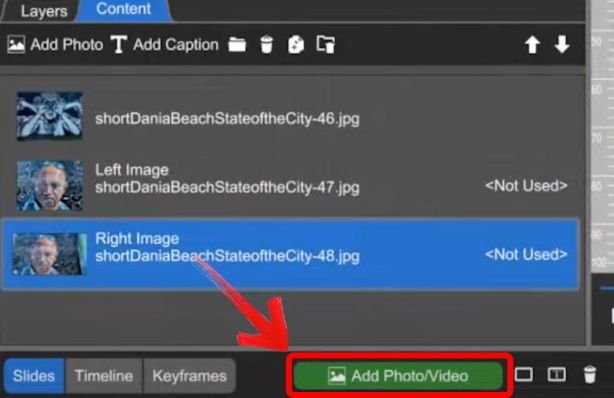
Step 2: Upload your photos, arrange them into the storyboard timeline.
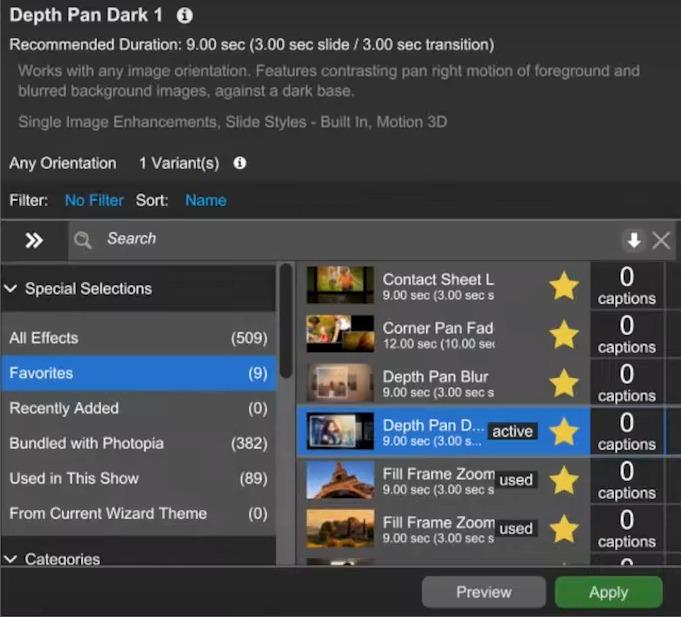
Step 3: Apply animations, titles, and transitions using the editor panel.
Step 4: Export your video byclicking on the “Save” button on the top left of your screen.

It took me a bit longer to get comfortable, but once I did, the results felt almost broadcast-quality. It’s one of the best slideshow creators without watermark.
Renderforest
Renderforest offers a comprehensive solution when a project requires more than just images, something that combines branding, animation, and fluid pacing. I was initially drawn to it because of its expertly created templates for corporate presentations, event trailers, and YouTube intros. I occasionally had to arrange several media components by a certain date, and this platform's guided workflow allowed me to remain concentrated without sacrificing my creative vision. During fast-paced projects, its ready-to-use assets and cloud-based setup made it particularly dependable. It's ideal for video-driven storytelling because it allows you to layer voiceovers, music, and motion in a way that feels dynamic yet balanced. That's what I like best about it.

Features:
Offers themed slideshow templates with built-in music and animated transitions.
Supports logo insertion, text overlays, and dynamic photo reveals.
Cloud-based editing means you can create slideshows without installing anything.
High-quality previews and exports available in multiple resolutions.
Pros:
Clean, modern templates for business and social use.
Fast rendering and export.
Accessible from any device.
Cons:
The free version adds watermark.
Limited customization beyond provided templates.
Renderforest is great for marketers and creatives who need stylish results with minimal effort.
Here’s some steps to use one of the best photo slideshow makers like Renderforest’s Slideshow Maker:
Step 1: Go to Renderforest'sslideshow website and choose a slideshow template.
Step 2: Upload your images to the timeline by clicking the “+” sign.

Step 3: Add optional logo, text, or soundtrack as per your preference.
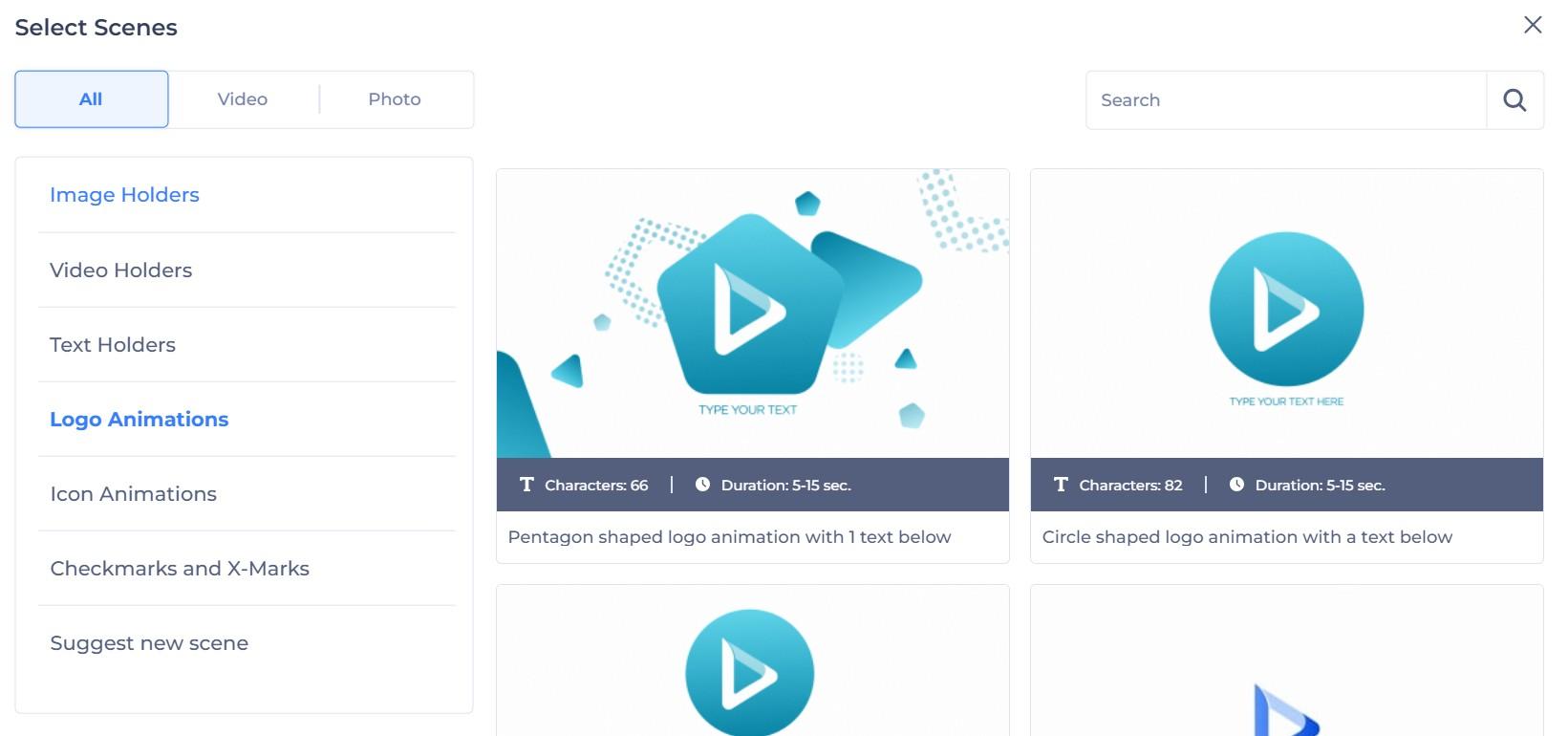
Step 4: Preview the slideshow andexport in your chosen resolution.

I’ve used it for client projects that required quick delivery with polished visuals, and it always delivered.
FlexClip Free Slideshow Maker
FlexClipbecame one of my go-to tools when I needed speed and simplicity without compromising on visual impact. I found it particularly useful for social media content, quick photo summaries, and short business promos. What made it stand out for me was its ability to combine photos, text, and stock footage into cohesive slideshows without much setup time.
I’ve also used it to make client-facing materials where timelines were tight, it’s reliable for turning around clean, professional-looking videos in minutes. Plus, the drag-and-drop interface made experimenting with layouts and musicfeel smooth. It’s a great pick for creators who want to focus on content, not just software learning.

Features:
Offers drag-and-drop interface with timeline editing.
Includes royalty-free music, text animations, and transitions.
Allows exporting videos without watermark for short projects.
No login required for basic use.
Pros:
Fast and beginner-friendly.
Supports exporting without watermark (in short videos).
Doesn’t require software installation.
Cons:
Limited control over detailed animations.
Best suited for short or simple slideshows.
FlexClip is ideal for quick slideshows when you want something functional and free.
Here’s some steps to use FlexClip’s slideshow maker:
Step 1: Visit FlexClip'sfree slideshow creator website.
Step 2: Upload your images and drag them into the timeline.

Step 3: Export anddownload the finished slideshow by clicking on the“Cloud” button.
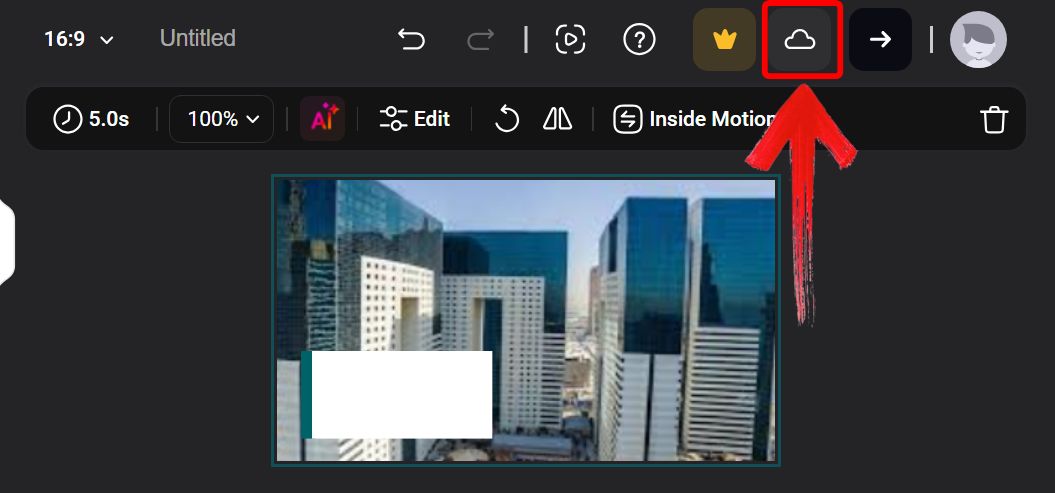
It’s my go-to when I need something fast and shareable without spending a dime.
Comparison Table
To help you decide which best slideshow app 2025 version fits your workflow, I’ve compared them based on ease of use, output quality, feature flexibility, and cost.
| Tool | Ease of Use | Customization | Output Quality | Free Plan Limitations | Best For |
|---|---|---|---|---|---|
| Movavi | Moderate | High | Excellent | Watermark | Professional visual projects |
| Photopia | Moderate | Very High | Excellent | Some paid features | Advanced editing and layering |
| Renderforest | Very Easy | Medium | Very Good | Watermark | Stylish branding or marketing |
| FlexClip | Very Easy | Basic | Good | Limited to short videos | Quick casual slideshows |
Each tool offers something unique. Movavi and Photopia excel in control and customization. Renderforest offers style and branding. FlexClip keeps things simple and fast.
Bonus Tool — Toolsmart Free Image Enhancer Online
I discovered Toolsmart’s Free Image Enhancer while looking for a lightweight way to enhance and finalize slideshow visuals without diving back into heavy editing software. What really struck me was how efficient it is, especially for touching up photos, removing distractions, or sharpening images before adding them into a video.
I’ve used it when I needed to quickly prep images for event recaps and social posts, and it always helped give the final result a cleaner, more polished look. Since it’s browser-based, there’s no delay in getting started, and the AIdoes a surprisingly good job on everything from face enhancement to lighting corrections.
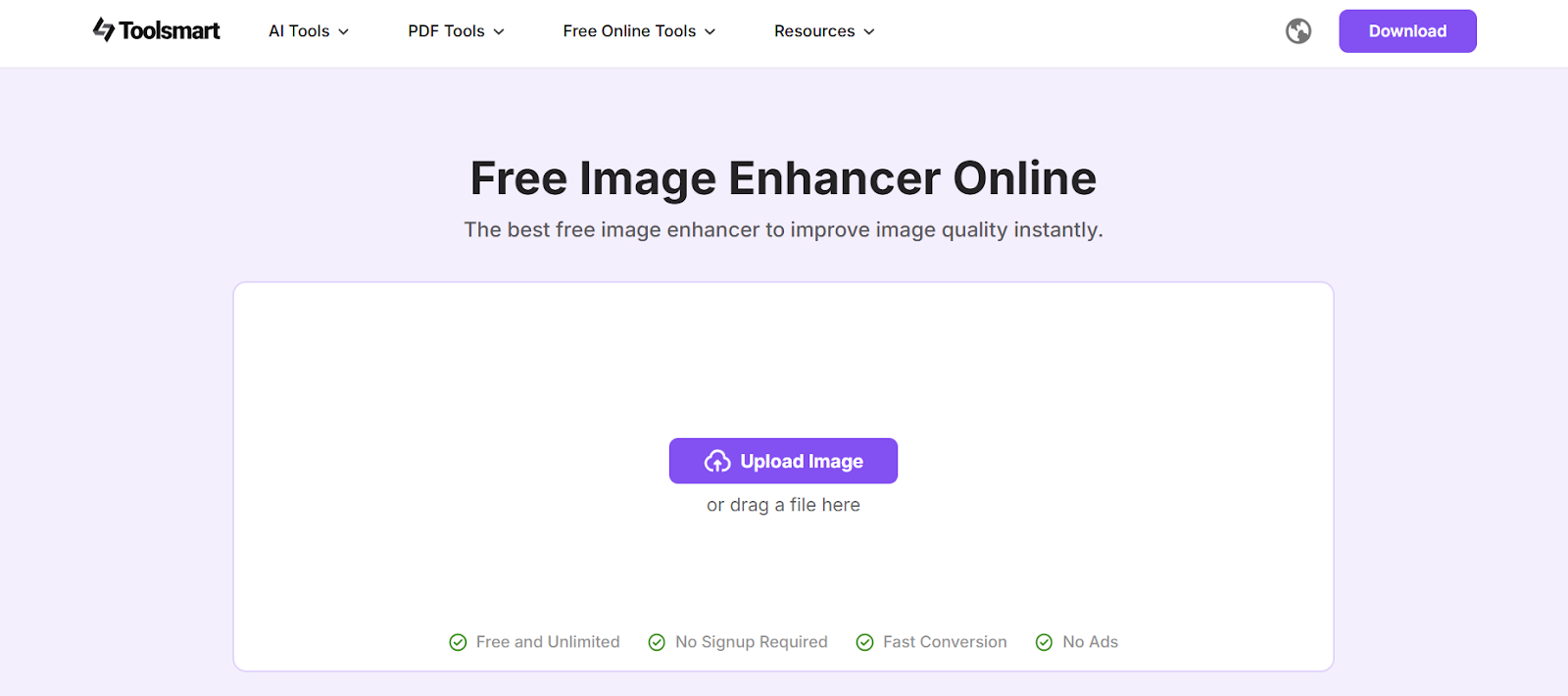
I found it especially useful for fixing older or lower-quality images that would’ve stood out poorly in a modern slideshow. It’s a great companion tool when you want each image to hold its own in the overall story.
Features:
Automatically improves lighting, detail, and sharpness.
Works entirely in your browser with no download.
Processes images in seconds using AI.
No watermarks or sign-up needed.
Pros:
Completely free to use.
Reliable output with fast AI.
Perfect for restoring or enhancing slideshow photos.
Cons
Focused only on enhancement, not editing.
Toolsmart is my go-to for prepping images. It’s fast, free, and consistently improves quality before I start building my slideshow.
Here’s some steps to use Toolsmart’s Image Enhancer:
Step 1: Visit Toolsmart Image Enhancer on your browser.
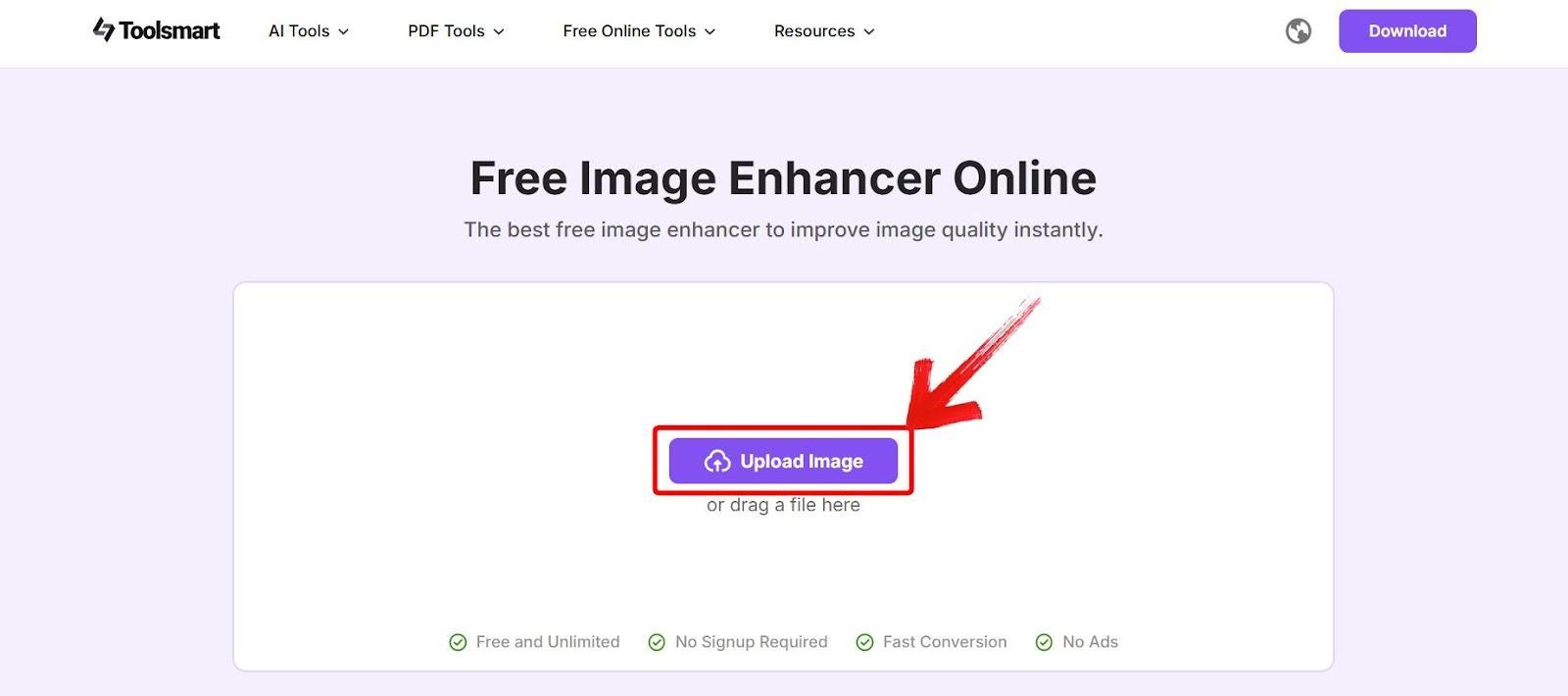
Step 2: Click on “Upload Image” and select the photo you want to enhance.
Step 3: Wait 5 to 10 seconds while the tool enhances your image, then preview the clearer version and clickon “Download” to save it.
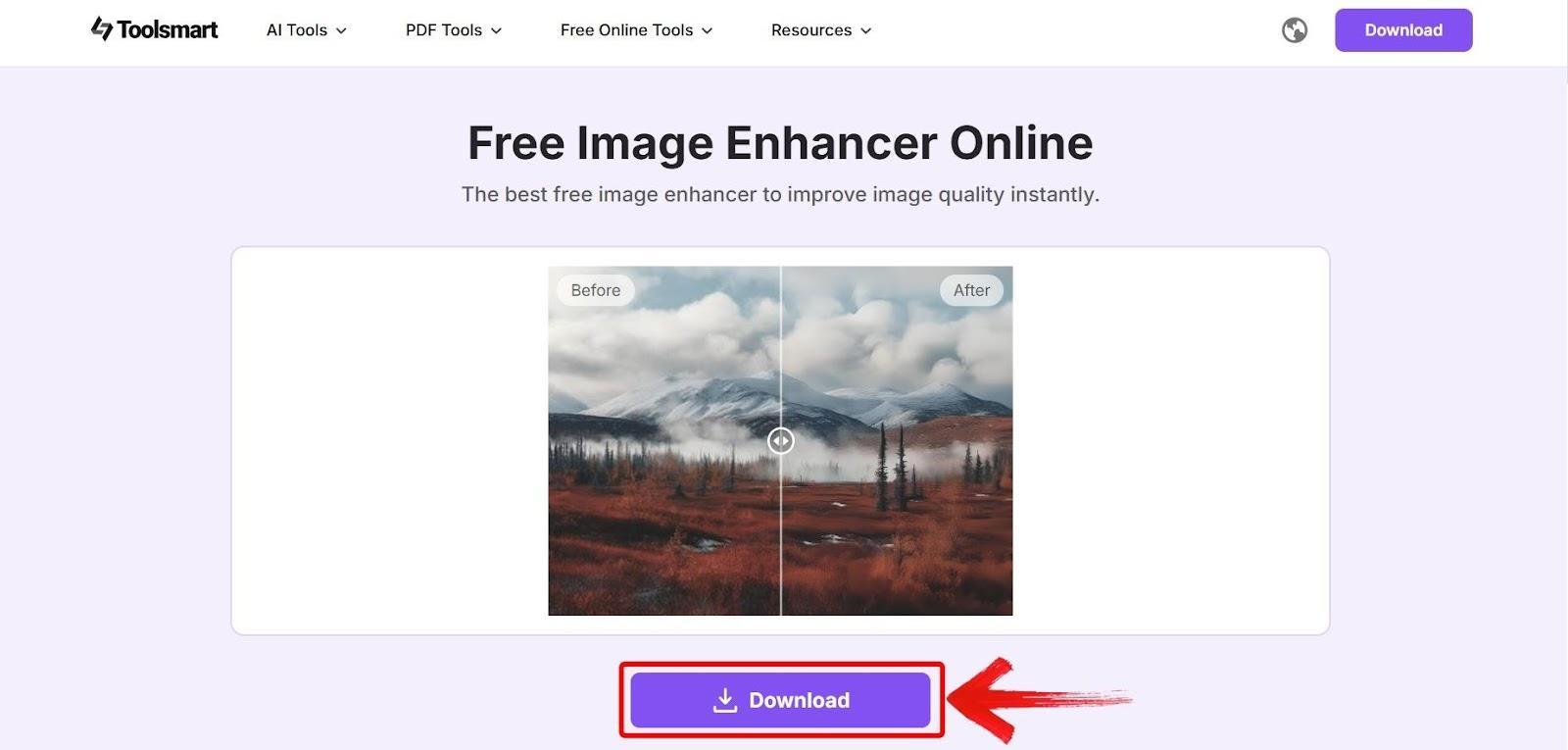
The results often surprise me, images come out brighter and cleaner with almost no effort.
FAQs
Q1: Which photo slideshow maker is best for beginners?
FlexClip is the easiest for beginners thanks to its drag-and-drop layout and no-install requirement.
Q2: Can I create a photo slideshow with music for free?
Yes, all four tools support music, though free versions of Movavi and Renderforest add watermarks.
Q3: How do I improve the quality of old photos before using them in a slideshow?
Use Toolsmart’s Free Image Enhancer to fix lighting, blur, and clarity issues before uploading.
Q4: Do these tools work without adding watermarks?
FlexClip offers watermark-free export for short videos. Photopia also allows clean exports under certain settings.
Choosing the Best Photo Slideshow Makers in 2025
Choosing the best photo slideshow makers in 2025 depends on what you need: full creative control, quick edits, or stylish templates. For advanced users, Movavi and Photopia provide deeper customization. If you're short on time, Renderforest and FlexClip offer fast, attractive results. And for enhancing photo quality before you begin, Toolsmart’s free image enhancer ensures your images look crisp and clear. Pick the tool that matches your workflow, and your slideshow will come together beautifully.


